Search Anything You Saw on Your Mac

Search Anything You Saw on Your Mac
You saw it somewhere.
In a meeting.
In a Teams chat.
In a shared screen.
In a dashboard.
In a document someone opened for two minutes.
But now you need it again.
What was the deadline?
What was the customer ID?
What did someone say during the call?
Which slide had the number?
Which chat message mentioned the project code?
This is exactly why we built Screen Memory in Fenn.
Screen Memory lets you search and ask about anything you saw, heard, or said on your Mac.
Work moves too fast to remember everything
Modern work is fragmented.
You jump between meetings, chat apps, documents, dashboards, PDFs, screenshots, video calls, browser tabs, and project tools.
The important detail is often visible for a few seconds, then disappears.
A manager says the deadline in a meeting.
A teammate shares an internal ID in Teams.
A client opens a slide with the new budget.
A vendor says the next delivery date on a call.
Someone shares a dashboard number, then moves on.
Later, you remember the idea, but not the exact detail.
That is the problem Screen Memory solves.
Example: find a deadline from a meeting
Imagine you were in a meeting last week.
Someone discussed the launch deadline, but you did not write it down.
Normally, you would have to search calendar notes, meeting recordings, chat threads, slides, and maybe ask someone again.
With Fenn Screen Memory, you can ask:
“What deadline was discussed for the launch?”
Fenn can help you find the moment where that deadline appeared or was said.
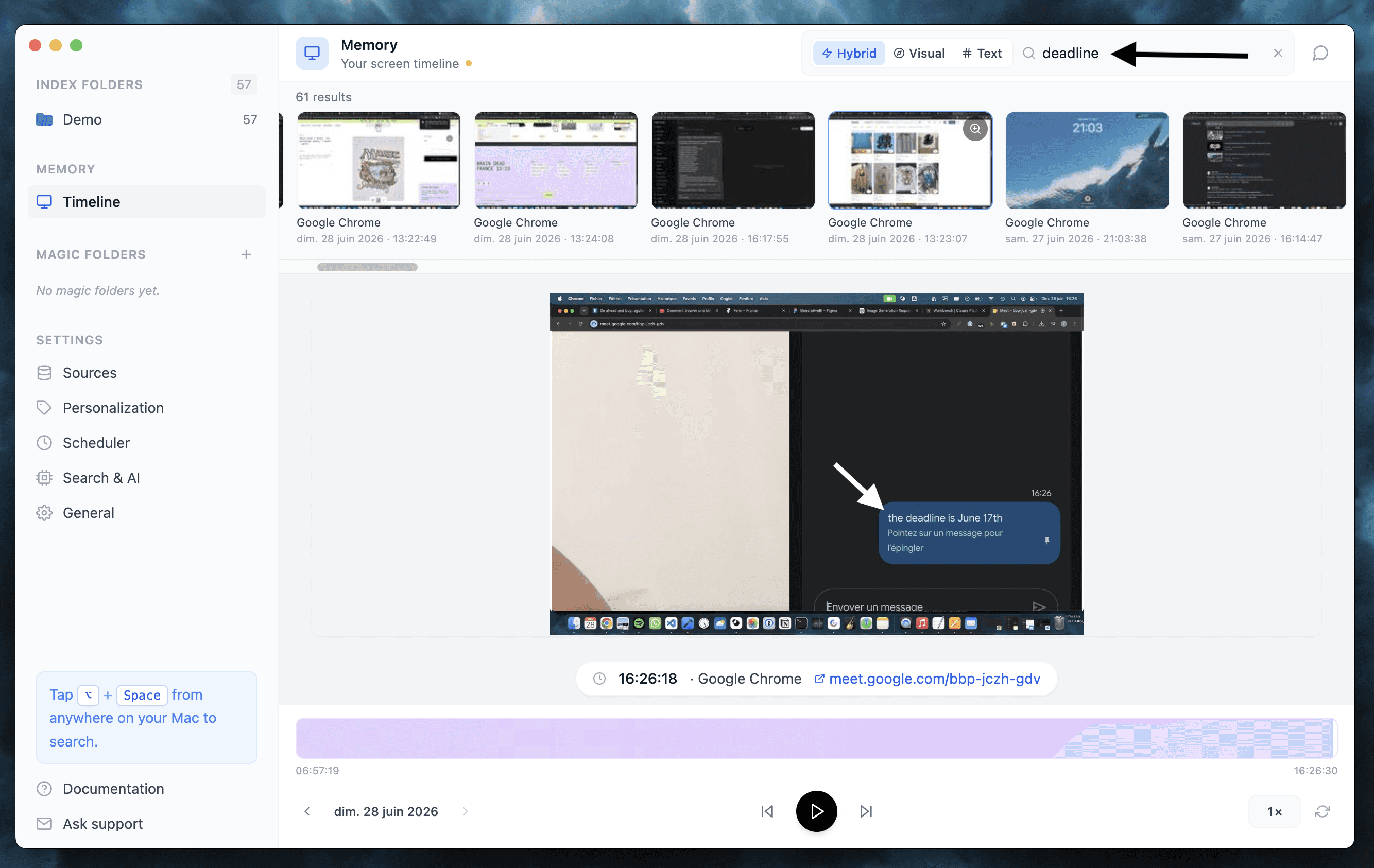
That turns your Mac into a private work memory.
Not because you perfectly organized everything.
Because Fenn can help you retrieve what happened.
Example: find an ID from a Teams chat
Here is another common work problem.
Someone wrote an ID in a Teams chat a week ago.
Maybe it was a customer ID.
A ticket number.
A contract reference.
A project code.
A server name.
A bug ID.
You remember seeing it, but not where.
Instead of scrolling through chats, you can search in Fenn:
“Teams message with the customer ID for Acme”
or:
“What ID did Sarah share for the migration?”
Fenn can help surface the relevant screen memory so you can get back to work faster.
Search what you saw, heard, or said
Screen Memory is useful because work is not only files.
Some important information never becomes a clean file.
It appears in:
meetings
chats
shared screens
dashboards
browser tabs
video calls
presentations
screen recordings
internal tools
quick conversations
Fenn helps you search that layer too.
You can search by what you remember, not only by where it was stored.
Private by design
A feature like Screen Memory has to be private.
Your screen can contain sensitive work.
Your meetings can contain confidential discussions.
Your chats can contain client details, IDs, invoices, contracts, code, financial information, and internal decisions.
That is why Fenn is built locally.
Fenn is Private AI that finds anything on your Mac.
Your private work should stay on your Mac.
Your searches should stay on your Mac.
Your memory should not become another cloud database.
Fenn is more than Screen Memory
Screen Memory is one more layer in Fenn.
Fenn can also help you:
search inside files
search PDFs, documents, images, audio, video, email archives, notes, Figma files, and Sketch files
jump to the exact page, frame, slide, or timestamp
run agentic search across files
create self-organizing folders
find and remove duplicates
rename files with AI
extract data from files into CSV
chat with files privately
capture on iPhone and find automatically on Mac
The goal is simple:
Make your Mac searchable.
Not just filenames.
Not just folders.
Everything you work with.
The bottom line
You should not lose important work details just because they appeared in the wrong place.
A deadline from a meeting.
An ID from a Teams chat.
A number from a shared screen.
A detail someone said out loud.
With Fenn Screen Memory, you can search anything you saw, heard, or said on your Mac.
Private.
Local.
Built for real work.
Related reading: