Use LM Studio With Your Mac Files
Use LM Studio With Your Mac Files
LM Studio is one of the easiest ways to run local AI models on your computer.
You can download models, choose the one that fits your machine, run it locally, and expose it through a local API server. LM Studio’s developer docs say it can serve local models on localhost and provide OpenAI-compatible and Anthropic-compatible endpoints.
That is great.
But a local model alone still has one big limitation:
It does not automatically know what is inside your files.
That is where Fenn comes in.
Fenn is Private AI that finds any file on your Mac.
It indexes your files locally, searches inside them, and lets you use AI features like Agentic search and Chat with Files.
Together, the idea is simple:
LM Studio runs the model. Fenn brings the file context.
Why connect LM Studio to Fenn?
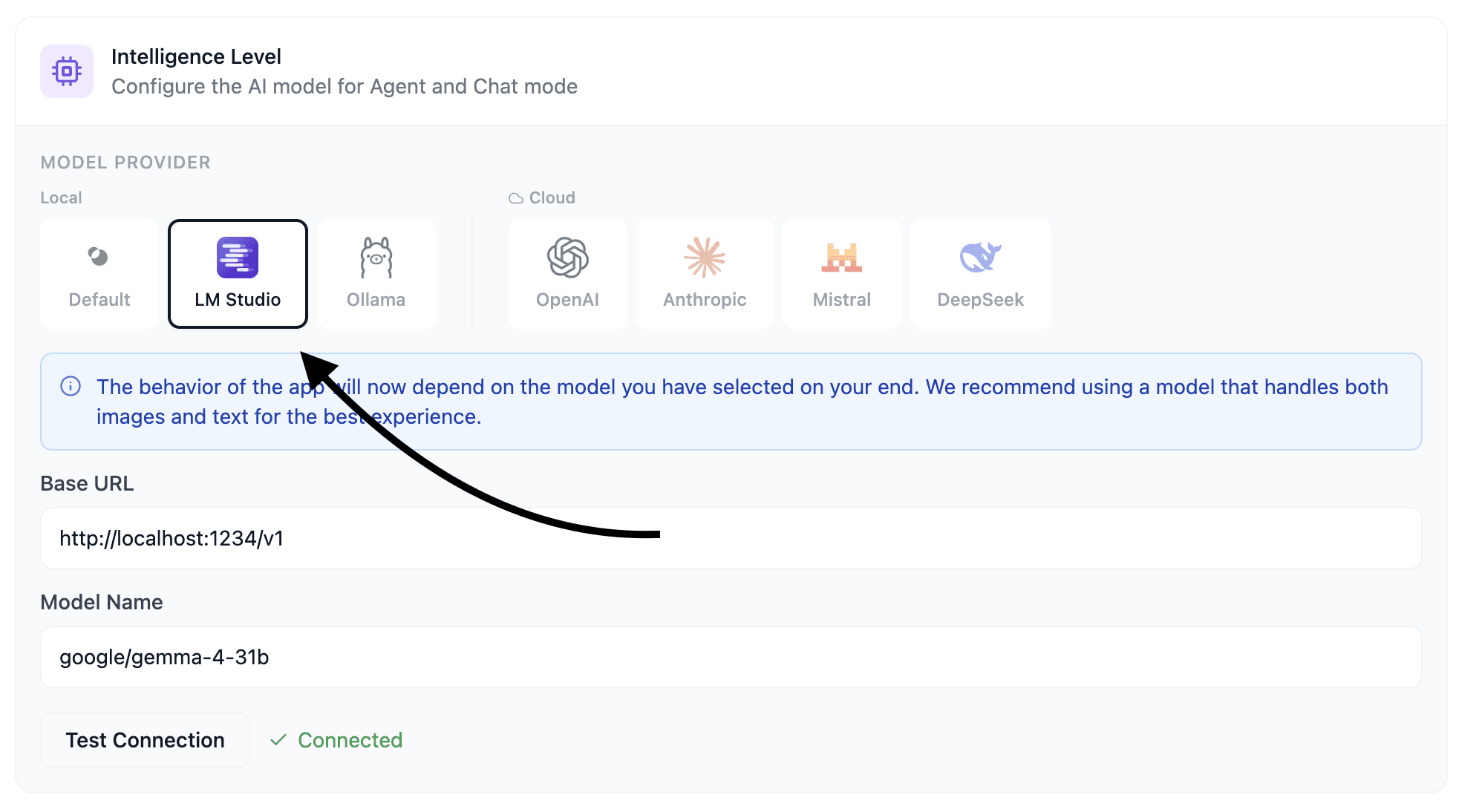
Fenn can connect to the model you manage in LM Studio.
That means you can use your own local model inside Fenn for AI features like:
Agentic search across files
Chat with Files
private file analysis
search workflows powered by a model you choose
This matters because local AI is not one-size-fits-all.
Maybe you want a small model because your Mac has limited RAM.
Maybe you want a larger model because you have more unified memory.
Maybe you care more about speed.
Maybe you care more about reasoning quality.
Maybe you want to test different models for different file workflows.
With LM Studio and Fenn together, you can choose the model that fits your hardware and use it with your actual Mac files.
The missing layer in local AI
A lot of people using LM Studio already understand the value of local models.
No API key.
No cloud dependency.
No external retention policy.
No monthly surprise because you tested too many prompts.
But local chat is only part of the story.
The useful workflow is not just:
“Ask a local model a question.”
The useful workflow is:
“Search my files, find the relevant context, and use my local model to help me understand it.”
Fenn provides that missing layer.
It can search inside PDFs, documents, images, screenshots, audio, video, email archives, Apple Notes, Figma files, Sketch files, and more.
Then your local model can work with the context Fenn finds.
No copy-pasting huge chunks manually.fa
No uploading private files to a cloud chat tool.
Local AI matters even more now !
The recent Claude Fable 5 drama made something obvious.
When a model lives in the cloud, access is not fully yours.
Anthropic said the US government issued an export control directive to suspend access to Fable 5 and Mythos 5 by foreign nationals, and that the practical effect was that Anthropic had to disable Fable 5 and Mythos 5 for all customers to comply.
That is the cloud AI problem in one sentence.
A model can be available today.
Then policy, regulation, business rules, pricing, safety settings, or access rules can change tomorrow.
With local AI, the model you downloaded is on your machine.
Nobody can quietly swap it out during your session.
Nobody can remove your access because a provider changed its policy.
Nobody can apply a cloud retention rule to your private prompts.
That is why local AI is not just a nerd feature.
It is a control feature.
Fenn keeps the file side local too
Running the model locally is only half the privacy story.
Your files also need to stay local.
Fenn indexes and searches on your Mac.
Your file index stays on your Mac.
Your searches stay on your Mac.
Your private documents, screenshots, recordings, notes, emails, and design files do not need to leave your device to become searchable.
That is what makes the LM Studio and Fenn combination powerful.
You get local models from LM Studio.
You get private file intelligence from Fenn.
The bottom line
LM Studio gives you control over the model.
Fenn gives that model useful context from your Mac files.
Together, they turn local AI from a chat box into a private file workflow.
Choose your model.
Fit it to your RAM and performance needs.
Use it for Agentic search and Chat with Files inside Fenn.
Keep the model local.
Keep the files local.
Download Fenn and find the moment, not the file.