Private AI on macOS Sonoma, turn your files into answers

Private AI on macOS Sonoma, turn your files into answers
macOS Tahoe gets most of the AI headlines. New models, new branding, new UI. If you already work on a Mac with Sonoma, it can feel like you are stuck waiting for some future update before you can use AI in a useful way.
You do not need to wait.
With Fenn on macOS Sonoma, your Mac can already use private AI on the files you have today. PDFs, docs, screenshots, Apple Mail, recordings. Fenn indexes them on device, then lets you ask questions in natural language and open the files that matter.
Your Mac stops being a pile of folders and becomes a private knowledge base.
What “AI on Sonoma” usually looks like today
Most people who say they use AI on Sonoma mean one of three things:
Copy pasting content into web tools
Using browser extensions that send data to remote servers
Letting separate apps ingest sensitive files in their own clouds
That approach has problems if you work with private material.
Contracts, NDAs, and internal strategy are too sensitive for random web forms
Finance and investor decks are not meant for vendor training
Long term archives never fully migrate to a single SaaS product
You end up with a powerful Mac that mostly runs tabs.
Private AI on Sonoma looks different. Your Mac reads its own files, locally, and helps you use them without shipping everything out.
What Fenn brings to macOS Sonoma
Fenn is a file search engine for macOS. It is built for Apple silicon and runs on device by default.
On Sonoma, Fenn can:
Index PDFs, Word files, spreadsheets, and long reports
Read text inside images and screenshots
Search Apple Mail messages stored on your Mac
Work with notes, internal docs, audio, and video, including useful timestamps
Let you search with natural language or precise filters
Use Agent Mode to answer heavier questions across many files
You choose which folders and app libraries to add as sources. Fenn indexes them on your Mac. Nothing needs to leave the machine.
Examples of private AI you can use today on Sonoma
Here are real things you can do on a Sonoma Mac with Fenn, without Tahoe and without a cloud tool.
Legal and contracts
“Contracts that auto renew and require more than 60 days notice. Show the relevant clauses.”
“Pages in NDAs mentioning jurisdiction in California.”
“Apple Mail threads where the client approved the updated MSA last spring.”
Finance and operations
“Invoices from vendor X above 500 dollars in 2024. Group by month.”
“Board slide and email where we discussed runway at 9 months or less.”
“Screenshots and PDFs that show Stripe revenue by month.”
Product and research
“Research notes and PDFs that mention macOS Sonoma battery impact.”
“Screenshots of dashboards where churn crossed 8 percent.”
“Design exports that use the new Liquid Glass style.”
Founders and leaders
“Board deck slides and mails that mention Tahoe upgrade risks.”
“Customer feedback where people asked for better search in Mail.”
“Docs and decks about the last pricing change.”
These workflows do not depend on Tahoe features. They depend on having your own files indexed and searchable on the Mac you already use.
Search modes that make Sonoma feel smarter
Fenn gives you four search modes that sit on top of Sonoma.
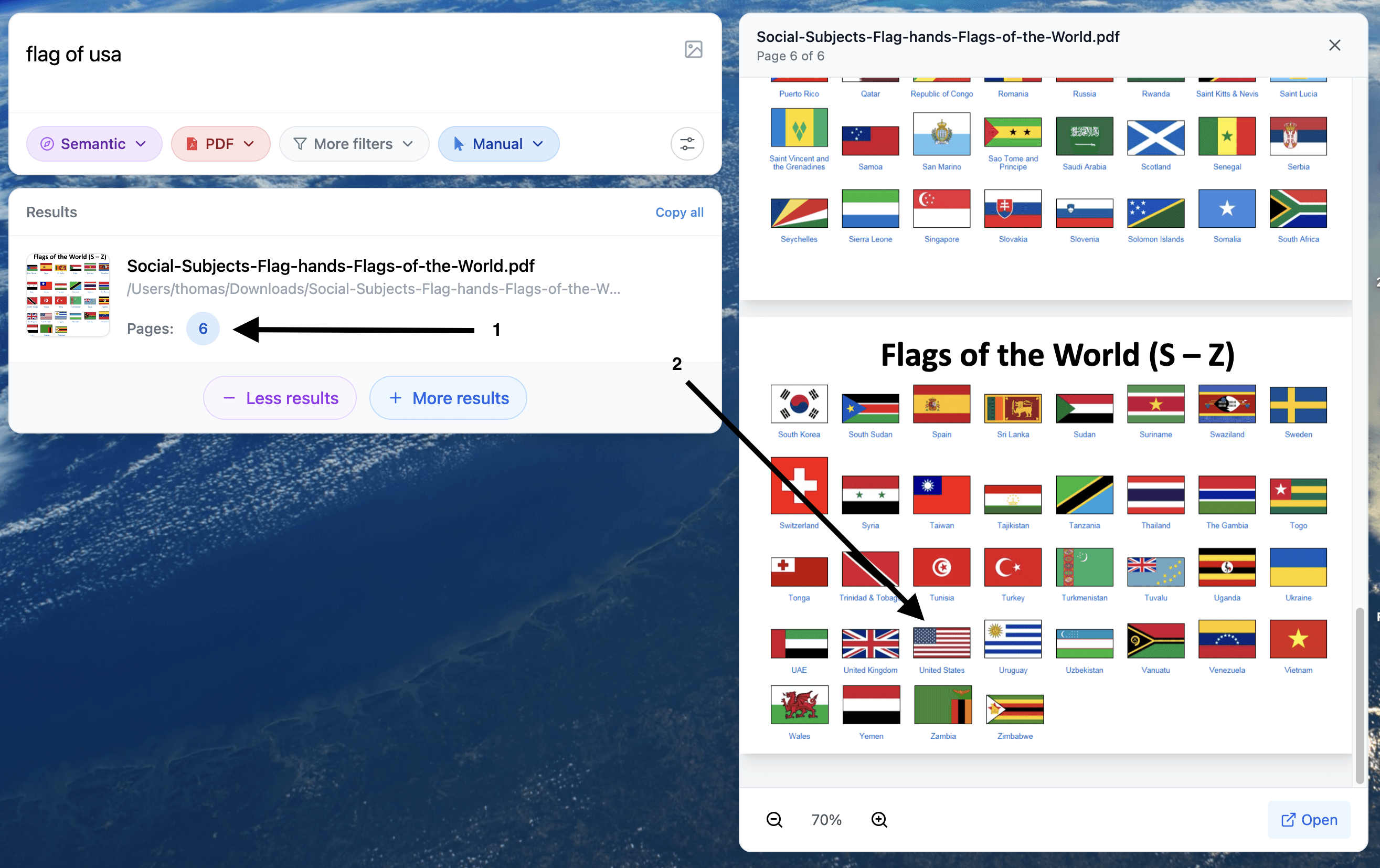
Semantic mode
Ask in natural language when you remember the idea, not the exact words.
“Contract where notice period is 60 days and auto renewal is on.”Keyword mode
Use exact phrases for legal text, product names, or precise wording.
“Termination for convenience within thirty 30 days.”Hybrid mode
Combine meaning and exact phrases in one pass.
“Board deck slide” plus a specific metric or phrase.Exact mode
Force strict literal matches when every character matters.
IDs, invoice numbers, ticket codes, error strings.
On Sonoma this feels like a new layer that sits between Spotlight and heavy AI tools, and it is entirely local.
Agent Mode on Sonoma for bigger questions
Sometimes you are not looking for one file. You want an answer that spans many.
Before Fenn, that meant:
Exporting data into spreadsheets
Opening twenty PDFs and skimming
Copy pasting chunks into external tools
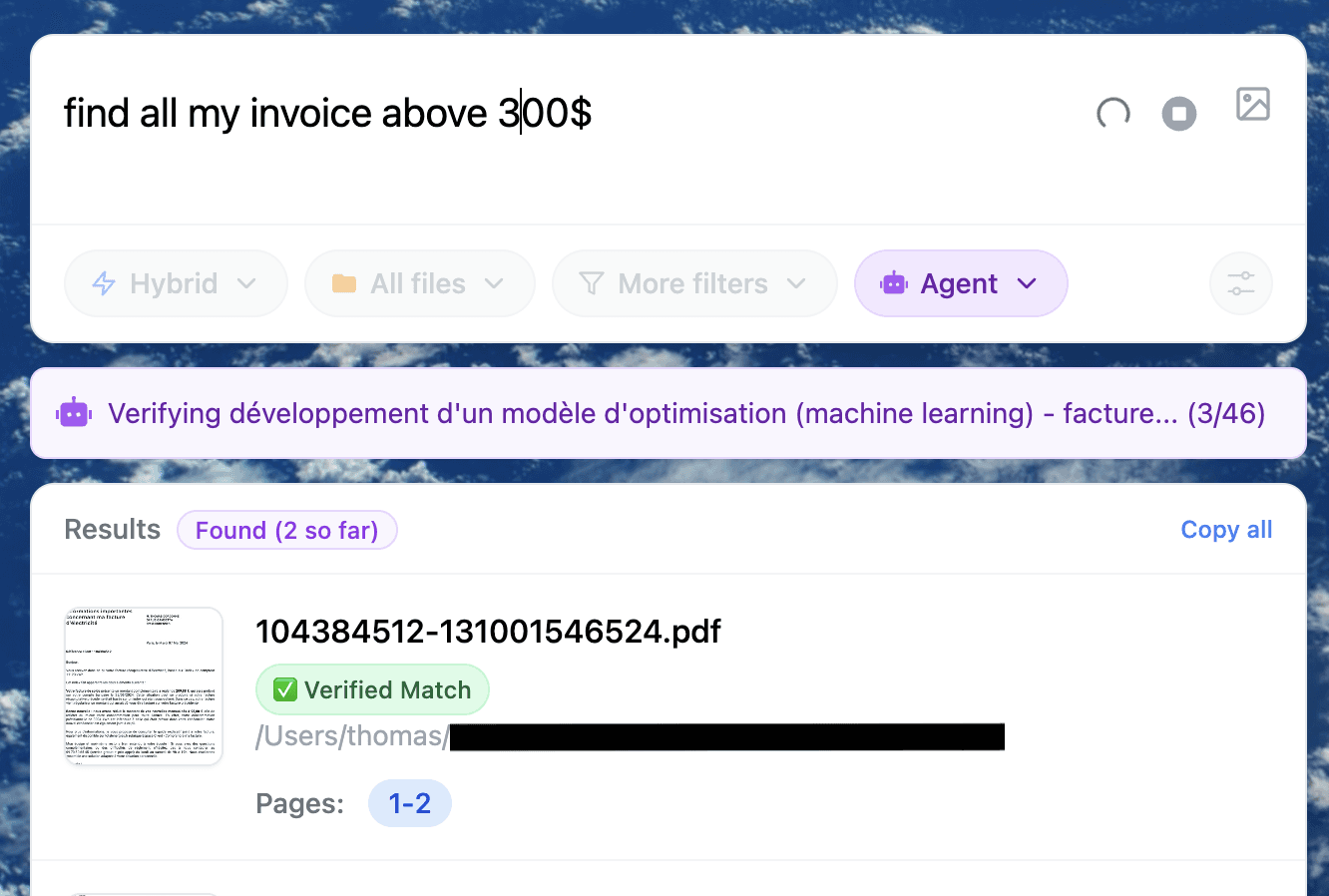
With Fenn Agent Mode on Sonoma, you can instead ask:
“List NDAs that auto renew and require more than 60 days notice, show the relevant paragraphs.”
“Summarize board discussions about moving from Sequoia to Tahoe, include slide and email references.”
“Find invoices from vendor X above 500 dollars this year and group by project.”
“Collect research pages that mention local AI on Mac and output a short summary.”
Agent Mode uses models running on your Mac. It reads your indexed content on device, then gives you structured answers and links back to the files. You stay in control. You open the originals and verify.
Agent Mode works best on Macs with more memory. It also runs on 16 GB. If you want help tuning it for your Sonoma machine, you can reach out to the Fenn team.
How to set this up on a Sonoma Mac in one afternoon
You do not need to rebuild your entire workflow.
Install Fenn on an Apple silicon Mac running Sonoma
Use Sonoma 14 or later for the best experience.Pick the folders that hold real work
For example:Projects or Clients
Legal or Contracts
Finance or Invoices
Research, notes, and reports
Screenshots and reference images
The folder where Apple Mail stores messages on disk
Add these as sources in Fenn
You stay in control of what is indexed.Let Fenn index on device
The first run over a large archive takes time. It all happens locally.Use Semantic mode as your default
Ask for what you remember. Switch to Keyword, Hybrid, or Exact when you need strict control.Try one Agent Mode question per area
One for contracts, one for invoices, one for board material, one for research.
Once this is done, you have private AI on Sonoma that understands your own files and does not depend on Tahoe.
Why this is better than waiting for Tahoe
You will likely upgrade to Tahoe at some point. But waiting for a new system version to start using AI on your work has a cost.
Your current files stay hard to search
Workflows that could be private stay in random web tools
You postpone learning how to ask questions of your own archive
Fenn runs on Sonoma right now.
You keep your existing Mac
You keep your existing apps
You add one layer that makes them searchable by meaning and structure
When you move to Tahoe later, your habits and indexed knowledge move with you.
Pricing
If you rely on your Mac for serious work, Fenn is a small upgrade compared to the value of your files and time.
Local, 9 USD per month, billed annually
On device indexing. Semantic and keyword search. 1 Mac. Updates. Founder support.Lifetime, 199 USD one time
On device indexing. Semantic and keyword search. 1 year of updates. 1 Mac. Founder support.
You do not have to wait for a new operating system to get useful AI on your Mac. You can install Fenn on Sonoma today and let your files start answering your questions.
Download Fenn for Mac. Private on device. Find the moment, not the file.