Which Mac to buy for private AI in 2025

Which Mac to buy for private AI in 2025
You want a powerful MacBook, you care about AI, and you do not want to paste your real work into random web tools. The question is simple. Which Mac should you buy so private AI actually feels useful and future proof.
For private AI on your own machine, one thing matters more than people think.
Memory is the hard limit. The chip decides how fast you can move. RAM decides how big a model you can load at all.
If you want to run local models comfortably, and use tools like Fenn for private file search and Agent Mode, you should treat RAM as the main decision and the chip generation as the second.
Why RAM is the hard limit for private AI
Large language models and similar systems are mostly just big blocks of numbers called weights. To run a model locally your Mac has to load those weights into memory. If they do not fit, you have to shrink or heavily compress the model, or not run it at all.
In practice:
Less RAM means
Smaller models
Heavier quantization
More trade offs in quality and context window
More RAM means
You can load larger models
You can handle longer prompts and more context
You are more ready for future on device models
This is true whether you are chatting with a local assistant or using private AI behind a product like Fenn.
Fenn uses models to understand your files, support semantic search, and power Agent Mode. Today these models are tuned for Apple silicon and realistic memory sizes. Over the next years, better models will appear that still need to fit inside your RAM.
So when you choose a Mac for private AI, think “what size models do I want to be able to run in two or three years” not just “what is fast today.”
Chip vs RAM, how to think about it
The chip generation matters. Newer Apple silicon gives you:
Better performance per watt
Faster matrix math for AI workloads
More comfort running heavier tasks
But the chip does not change the basic fact that model weights must fit into memory.
That is why, for many serious users, a configuration like:
M3 Max with 96 GB of RAM
can make more sense for private AI than:
M4 Max with 32 GB of RAM
The newer chip is nice. The extra RAM is what lets you load bigger models and keep using them as software evolves.
A simple way to think about it:
8 GB
Too tight for serious local AI. Things will technically run, but you are forced into tiny models and constant constraint.16 GB
Usable baseline. Good for Fenn indexing, semantic search, and light Agent Mode, as long as you do not run huge models or massive workloads at the same time.32 GB
Comfortable for private AI today. Better headroom for indexing, larger context windows, and Agent Mode on realistic archives.64 GB and 96 GB and above
Future proof for local models. You can run larger models, keep more context, and still have room for your other apps. This is the sweet spot for people who want private AI to be a normal part of their daily work.
How model size and RAM play together
To make this more concrete, think in terms of capacity.
Model weights are loaded into memory
Intermediate calculations and caches also need space
Your system and other apps still need their share
When RAM is tight you have to:
Use very small models
Heavily quantize them
Shorten prompts and context windows
Close other apps while you run AI workloads
When RAM is generous you can:
Run more capable models at once
Keep longer context
Work with Fenn, your browser, and creative tools open together
Stay ready for the next generation of local models
You will notice this over the lifetime of the machine, not in one benchmark. A high RAM Mac will still be able to run new local models when a lower RAM machine is already stuck.
Where Fenn fits in this picture
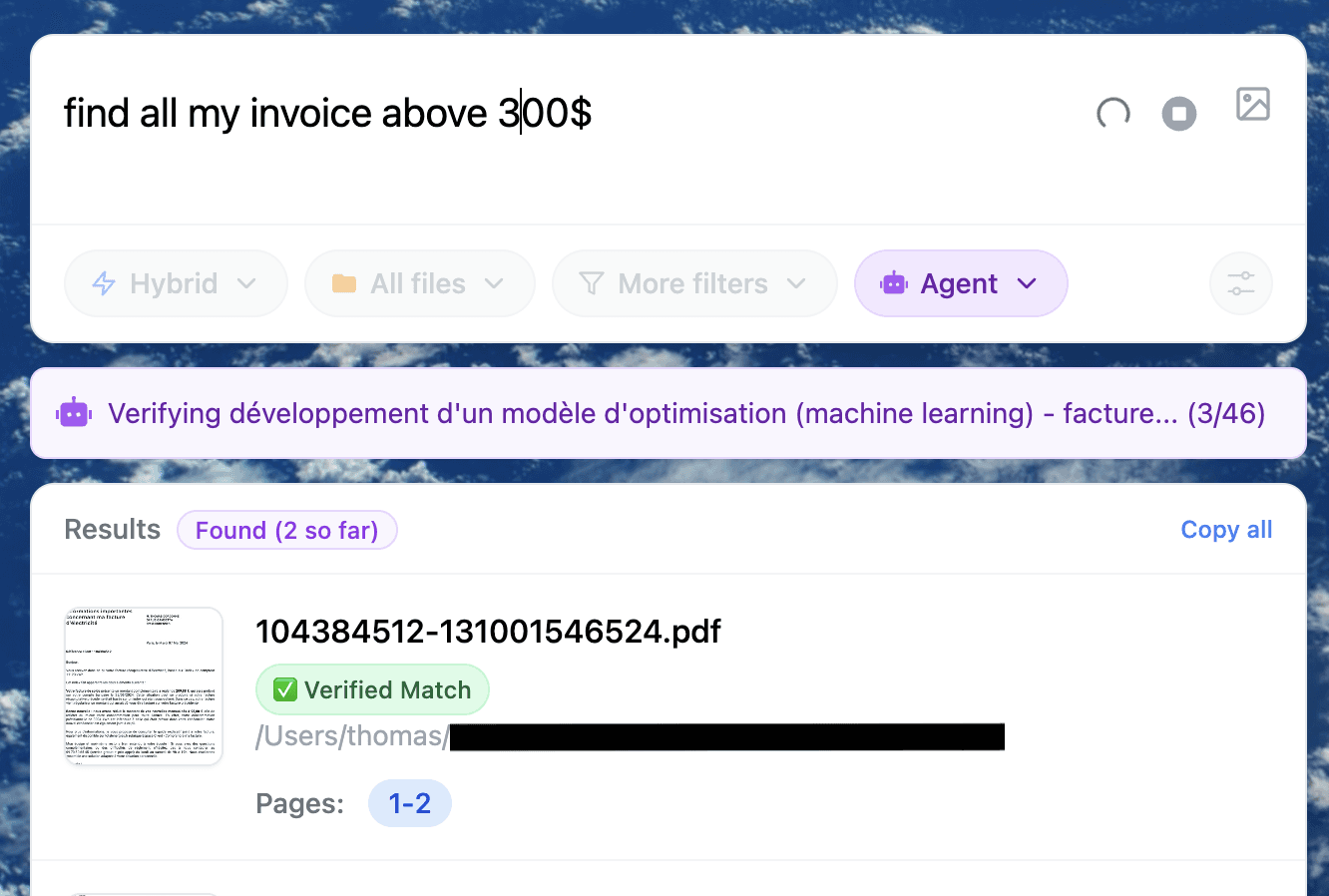
Fenn is a file search engine for macOS that runs on device by default. It:
Indexes PDFs, Office docs, images with text, Apple Mail, notes, audio, and video
Lets you search in natural language, or with Keyword, Hybrid, and Exact modes
Uses Agent Mode to answer heavier questions across many files
Builds on Apple silicon and ML friendly frameworks under the hood
Today, Fenn is tuned so it works well across a range of Apple silicon machines. More RAM gives you:
Faster initial indexing for huge libraries
Smoother semantic search when many apps are open
More comfortable Agent Mode runs over large sets of documents
Agent Mode works best on higher memory Macs, especially if you index lots of large files. It also runs on 16 GB. If you want help tuning settings on your Mac, contact us.
How different chip generations fit in
You do not need the latest chip, but newer ones help.
A practical view in 2025:
M1 and M2
Still very capable, especially at 16 GB or more. Good for Fenn indexing and semantic search. Fine for lighter local models and moderate Agent Mode use.M3 and M4
Better performance and efficiency. With 32 GB or more RAM these chips are excellent daily private AI machines.M5 and beyond
M5 already improves inference speed, especially with Neural Accelerators in the GPU. Paired with enough RAM, these machines are ideal for heavier local models and richer Agent Mode workflows.
The key is not to trade away memory for a small bump in chip generation. Better to have more RAM on a slightly older chip than too little RAM on the newest one.
Should you wait for M5 Max or Ultra
If you can wait and you know you care about private AI long term, it is reasonable to hold out for an M5 Max or Ultra style machine.
You are likely to get:
Higher RAM ceilings
Better access to Neural Accelerators
More comfortable performance on larger local models
That makes sense if:
Your current Mac is fine today
You want your next Mac to serve as a private AI workstation for many years
You plan to lean on tools like Fenn and other local model setups regularly
If you cannot wait, make the best choice now:
Pick a recent chip, M2, M3, or M4
Go for at least 16 GB, ideally 32 GB or more
Treat this machine as a strong private AI base that you can use right away
Recommended configs by use case
These are guidelines, not strict rules, but they match how Fenn users tend to work.
Knowledge workers and founders
You live in docs, decks, email, and recordings.
16 GB as baseline, 32 GB preferred
M2 or M3 Pro laptop with 32 GB is a great everyday machine
Fenn will index your work, search semantically, and run Agent Mode on realistic folders
Designers, engineers, and creators
You juggle creative suites, IDEs, containers, and large assets.
32 GB minimum, 64 GB if budget allows
M3 or M4 Pro or Max tiers make sense
Fenn happily runs alongside Photoshop, Illustrator, Xcode, Docker, and browsers without constant pressure
Legal, finance, and research
You manage huge PDF sets, scans, and data heavy documents.
32 GB baseline, 64 GB or 96 GB ideal
High RAM MacBook Pro or Mac Studio is worth the investment
Fenn becomes your contract triage, discovery helper, and research engine, all local
AI heavy builders who can wait
You want to push local models hard.
Wait for M5 Max or Ultra with high RAM options
Plan to use those machines as multi year private AI workstations
Use Fenn as the layer that turns that power into file understanding and Agent workflows
If you already have an M1 or M2
You probably do not need to replace it immediately.
If you have:
16 GB or more
A stable macOS version
Reasonable expectations for model size
you can:
Install Fenn now
Index your core folders
Use semantic search and Agent Mode today
Decide on a high RAM M5 machine later when it arrives
Your next Mac can be the long term private AI machine. Your current Mac can already benefit from Fenn in the meantime.
A simple path to a good private AI Mac
Whatever you pick, you can follow this simple order.
Choose your RAM first
Decide honestly between 16, 32, 64, or 96 GB. Remember that RAM is where models live, not just apps.Pick a recent Apple silicon chip next
M2, M3, or M4 are all fine. Take the newest you can afford inside the RAM tier you chose.Install Fenn early
Put Fenn on the machine as soon as you set it up. Treat it like core system infrastructure.Index the right folders
Projects, contracts, finance, creative work, research, and Mail storage. Fenn does not need your entire disk.Use Semantic and Agent Mode regularly
Make natural language search and cross file questions part of how you work, not a novelty.
Your Mac stops being a generic fast laptop. It becomes a private AI tool for your own data.
Download Fenn for Mac. Private on device. Find the moment, not the file.