Local vs cloud AI on your Mac, what you should really use

Local vs cloud AI on your Mac, what you should really use
Most people run AI in the browser and never think about where the data goes.
You paste contracts into a chat box, upload board decks to “analyze,” send invoices to be summarized. It feels magical, until you remember that all of this runs on someone else’s servers.
At the same time, local AI on Apple silicon has become practical. You can now index your own files, chat with them, and run analysis on your Mac, with models that never leave the machine.
This article gives you an honest comparison of local AI on your Mac versus cloud AI, and shows where Fenn fits as the private option.
Local vs cloud AI on Mac, side by side
Aspect | Local AI on your Mac | Cloud AI in the browser |
|---|---|---|
Where it runs | On your Mac, models use Apple silicon and RAM | On remote servers owned by the provider |
Data location | Files and prompts stay on your disk | Prompts and uploads are sent to the provider |
Privacy | Highest control, nothing leaves your Mac unless you choose | Strong policies possible, but data still exists on someone else’s systems and may be logged or requested in disputes |
Model quality | Limited by your hardware and what you install, still very capable for many tasks | Typically access to the newest and largest models |
Offline | Works offline once models and indexes are set up | Requires a network connection |
Speed and latency | Often very responsive, no round trips to servers, depends on your chip and RAM | Depends on network and provider load, often fast but not under your control |
Setup | You choose which folders to index and which models to run | Usually just open a website or app and sign in |
Costs | Hardware cost up front, plus local software like Fenn | Ongoing subscriptions or usage charges for multiple tools |
Use cases | Confidential work, contracts, finance, internal docs, email, long term archives | General web knowledge, coding help, public research, non sensitive drafts |
The honest pros and cons of cloud AI on your Mac
Where cloud AI shines
Cloud models are great at:
General knowledge and public web questions
Coding help and API examples
Brainstorming and rewriting non sensitive text
Tasks that do not touch your internal documents at all
You do not install anything. You get:
A powerful model
Large context windows
No need to think about RAM or storage
New features that arrive without your involvement
If you are asking about the world, not your own work, this is often the best choice.
Where cloud AI is a bad fit
Cloud AI is much less ideal when you:
Work with contracts, NDAs, or confidential commercial terms
Handle internal strategy docs and board decks
Own detailed financial statements and investor materials
Deal with regulated data or strict client confidentiality
In that case you are sending sensitive text to an external service, even if the provider promises strong privacy and enterprise controls.
Your data is:
Sent over the network
Processed on remote machines
Potentially logged in some form
You also have no offline mode. If your connection is weak or you are on the road with bad service, you lose access.
The honest pros and cons of local AI on your Mac
Where local AI shines
Local AI on your Mac is best when you:
Need the strongest possible privacy by default
Work in industries where sending files to third party services is not acceptable
Want to be able to keep working offline
Use a powerful Mac with enough RAM to run serious models
With Fenn, local AI means:
Your files never leave your Mac
Fenn indexes your PDFs, docs, screenshots, Apple Mail, audio, and video on device
Chat and analysis run on Apple silicon, not a cloud GPU
You can pull answers from contracts, decks, and email while staying offline
This fits lawyers, finance teams, founders, traders, researchers, and anyone who handles material that cannot live on random vendor servers.
The tradeoffs for local AI
Local AI has real constraints.
Models are limited by your hardware
The less RAM you have, the smaller the models you can run comfortably
Very large models that cloud providers use are not always practical on a laptop today
In practice:
16 GB Macs can still do useful private AI, especially with focused tasks and careful tuning
32 GB or more feels better for heavy document libraries and frequent chat or Agent style analysis
The more RAM you have, the larger or more efficient the models Fenn can use on your machine
There is also some setup work. You choose what to index, you point Fenn at your folders, and you let it build an index locally. After that, the experience feels as simple as cloud tools, but the first steps live on your Mac.
How Fenn uses local AI on your Mac
Fenn is built for Apple silicon, with privacy first.
It:
Indexes PDFs, Word files, spreadsheets, long reports
Reads text inside images and screenshots
Searches Apple Mail messages stored on your Mac
Works with notes, internal docs, audio, and video with useful timestamps
Runs on device by default, you control which folders and libraries are included
On top of that index you get:
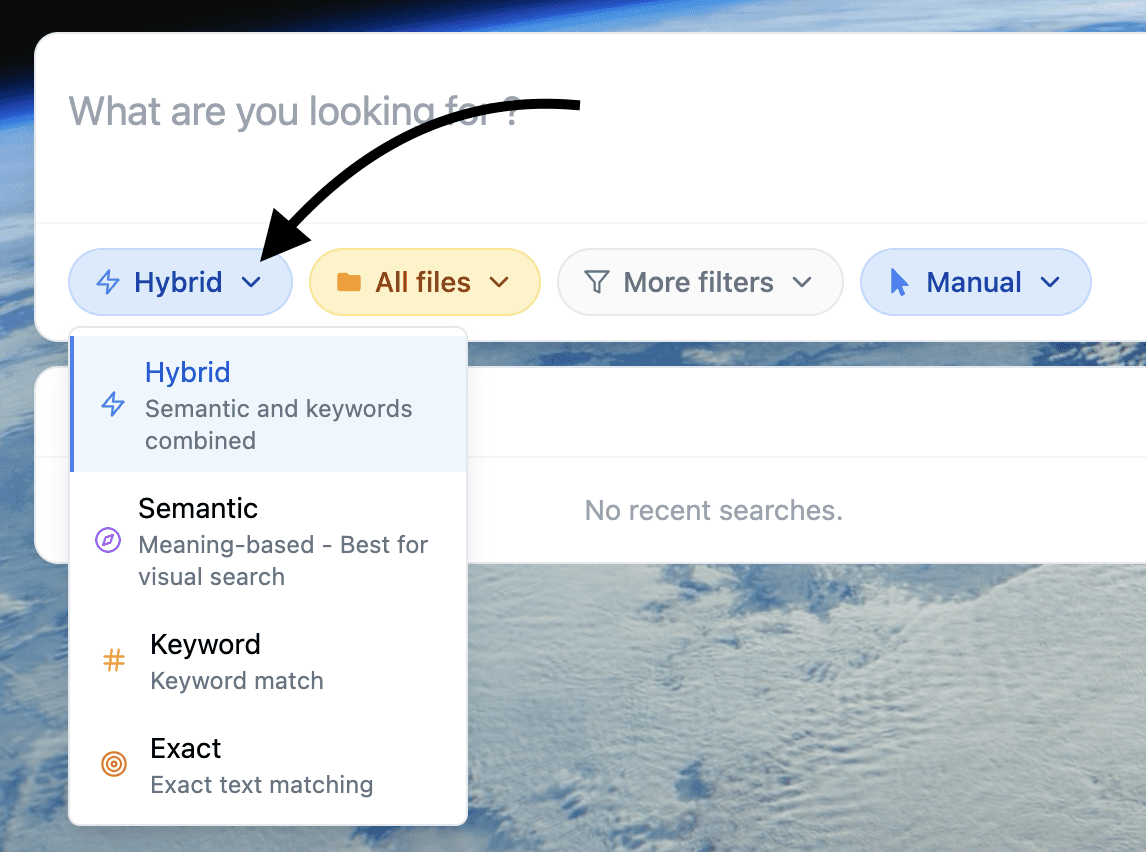
Search modes
Semantic for natural language questions
Keyword for exact wording
Hybrid for a mix of both
Exact when every character matters
These modes let you jump to specific pages, messages, or timestamps without opening everything manually.
Chat mode
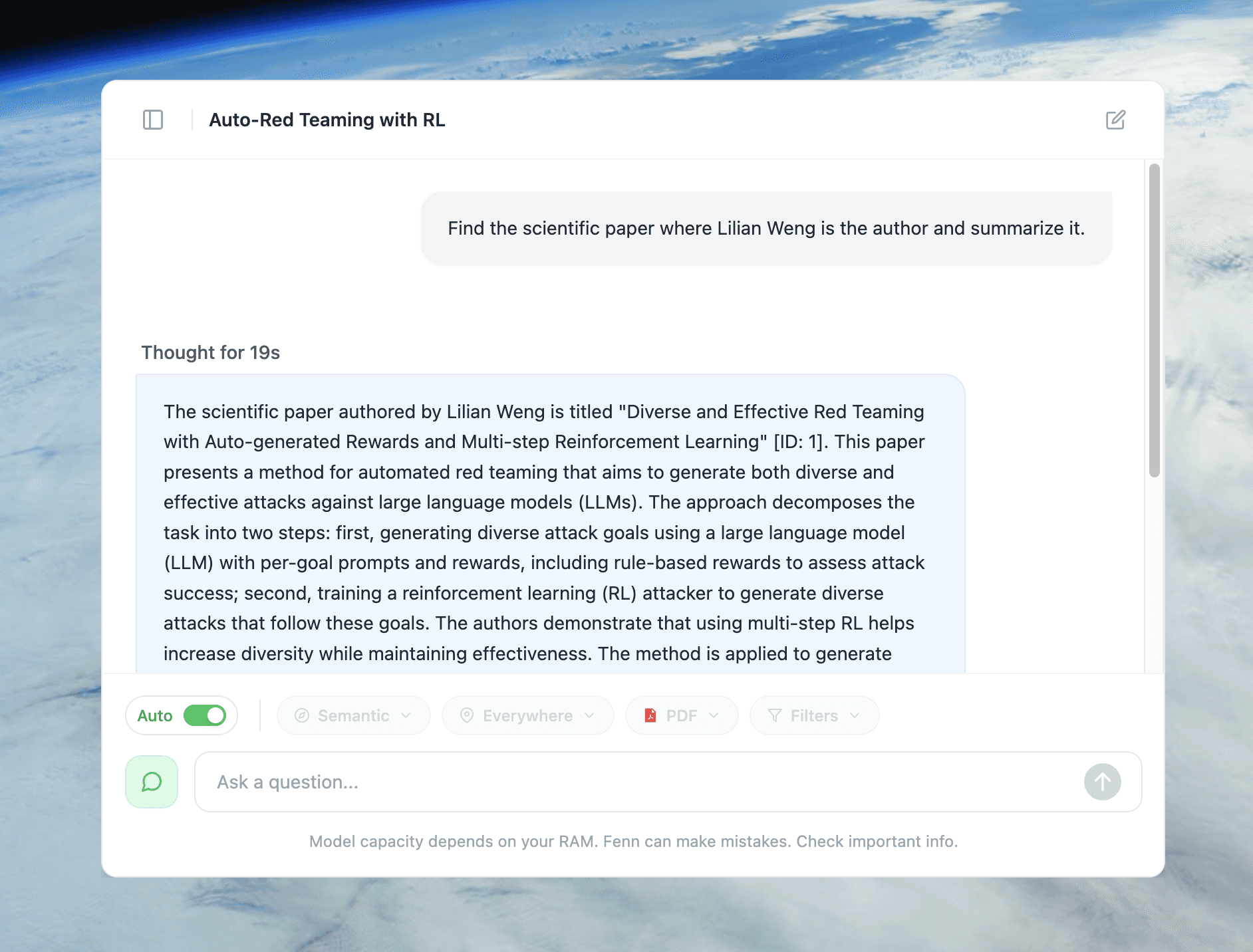
You can now chat with your own files in a chat window.
Ask questions in plain language
Fenn finds relevant sections across your indexed content
Local models read them and answer
You follow up and refine like you would with a colleague
You open the source files to verify
All of this stays on your Mac.
When to use each, in simple rules
You do not have to pick one forever. Use both, with clear boundaries.
Use cloud AI when
You are asking about public knowledge or generic topics
You need code examples or stack traces explained
You are brainstorming marketing copy that does not reveal sensitive data
You are researching technology, history, or general concepts
In these cases, your prompts are not confidential and the provider’s servers are an acceptable place to process them.
Use Fenn local AI when
You are talking about your contracts and customer deals
You need to summarize board decks or investor updates
You are exploring internal financial statements and invoices
You want to search screenshots and Mail for past decisions
You have to comply with confidentiality clauses or regulatory rules
In these cases, your prompts and documents stay inside your Mac, and the AI sits next to your work, not in front of it.
Local AI feels better on a high end Mac
If you invested in a MacBook Pro with a big SSD and plenty of RAM, local AI is how you get full value from it.
With Fenn on a high end Mac you can:
Index years of documents, images, and Mail
Run Chat mode over real contract and finance questions
Use Agent style analysis on bigger slices of your archive
Keep everything running smoothly while other apps are open
You are using your RAM and Apple silicon to protect and understand your own data, not only to hold browser tabs.
If you are still choosing a machine, this ties into your buying guide.
Extra RAM is what lets you load more powerful models and larger indexes
Newer chips improve speed and efficiency, but cannot replace memory
Local AI will keep improving as Apple chips grow more capable. The core idea stays the same. The safest place for your confidential work is still your own Mac.
How to start using local AI on your Mac
You can shift critical workflows to local AI in one afternoon.
Install Fenn on an Apple silicon Mac
Sonoma 14 or later is recommended.Pick the folders that really matter
Contracts, Legal, Finance, Board, Projects, Research, Screenshots, and the folder where Apple Mail stores messages.Add them as sources in Fenn
You decide what local AI can see.Let Fenn index on device
The first pass can take time, especially on a big archive. It stays on your Mac.Start with search modes
Use Semantic and Hybrid for questions where you remember the idea, Keyword or Exact when wording matters.Move sensitive prompts from browser to Fenn chat
Whenever you are about to paste confidential text into a cloud tool, open Fenn chat instead and ask the question locally.
Over time, the pattern becomes simple. Cloud AI for the outside world. Fenn local AI for everything you would be nervous emailing to a stranger.
Pricing
If your Mac holds your contracts, decks, and internal files, Fenn is a small investment to keep them private and useful.
Local, 9 USD per month, billed annually
On device indexing. Semantic and keyword search. Chat mode on 1 Mac. Updates. Founder support.Lifetime, 199 USD one time
On device indexing. Semantic and keyword search. Chat mode on 1 Mac. 1 year of updates. Founder support.
Use cloud AI where it shines. Use Fenn where privacy and control are non negotiable.
Download Fenn for Mac. Private on device. Find the moment, not the file.