Fenn vs Eagle: Files or Assets?
Fenn vs Eagle: Files or Assets?
Eagle is a good tool if your world is mostly visual assets.
It helps designers collect, browse, search, and organize images, references, screenshots, videos, fonts, and other creative material. Eagle describes itself as an asset manager tailored for designers.
That is useful.
But it is only one part of the problem.
Most people do not only need to find assets.
They need to find files.
That is where Fenn is different.
Try Fenn if you want Private AI that finds any file on your Mac, not just the assets inside a library.
Eagle is for a library. Fenn is for your Mac.
Eagle works best when you are building a visual library.
You add assets, organize them, tag them, browse them, and search inside that collection.
That is great for inspiration, moodboards, references, images, videos, fonts, icons, and design materials.
But your real work is usually bigger than that.
It also includes:
PDFs
contracts
invoices
client briefs
meeting notes
screenshots
RAW photos
Photoshop files
Illustrator files
InDesign files
presentations
videos
audio recordings
email archives
Apple Notes
old folders
Eagle helps with one slice of the workflow.
Fenn searches the whole thing.
Fenn can handle the asset search problem too
If your goal is to find images, screenshots, visual references, videos, or creative files, Fenn can help.
Fenn can search inside images, find text inside screenshots, search RAW photos, search by content similarity, recognize faces, search video, and search inside Adobe files like .psd, .ai, and .indd.
So Fenn can cover a lot of the reason people look for an asset search tool in the first place.
But then it goes further.
You can search the contract connected to the asset.
The invoice connected to the client.
The PDF brief connected to the project.
The email archive connected to the old account.
The video timestamp where the product appears.
The audio recording where the client mentioned the revision.
That is the difference.
Eagle helps you organize creative assets.
Fenn helps you retrieve the full project.
The problem with asset-only search
An asset library is clean.
Real folders are not.
Real folders contain files like:
IMG_8042.pngFinal_v7.pdfClient_notes_old.docxRecording_011026.mp3export_447.movinvoice_march_final.xlsx
You do not always remember the filename.
You remember what was inside.
Fenn is built for that.
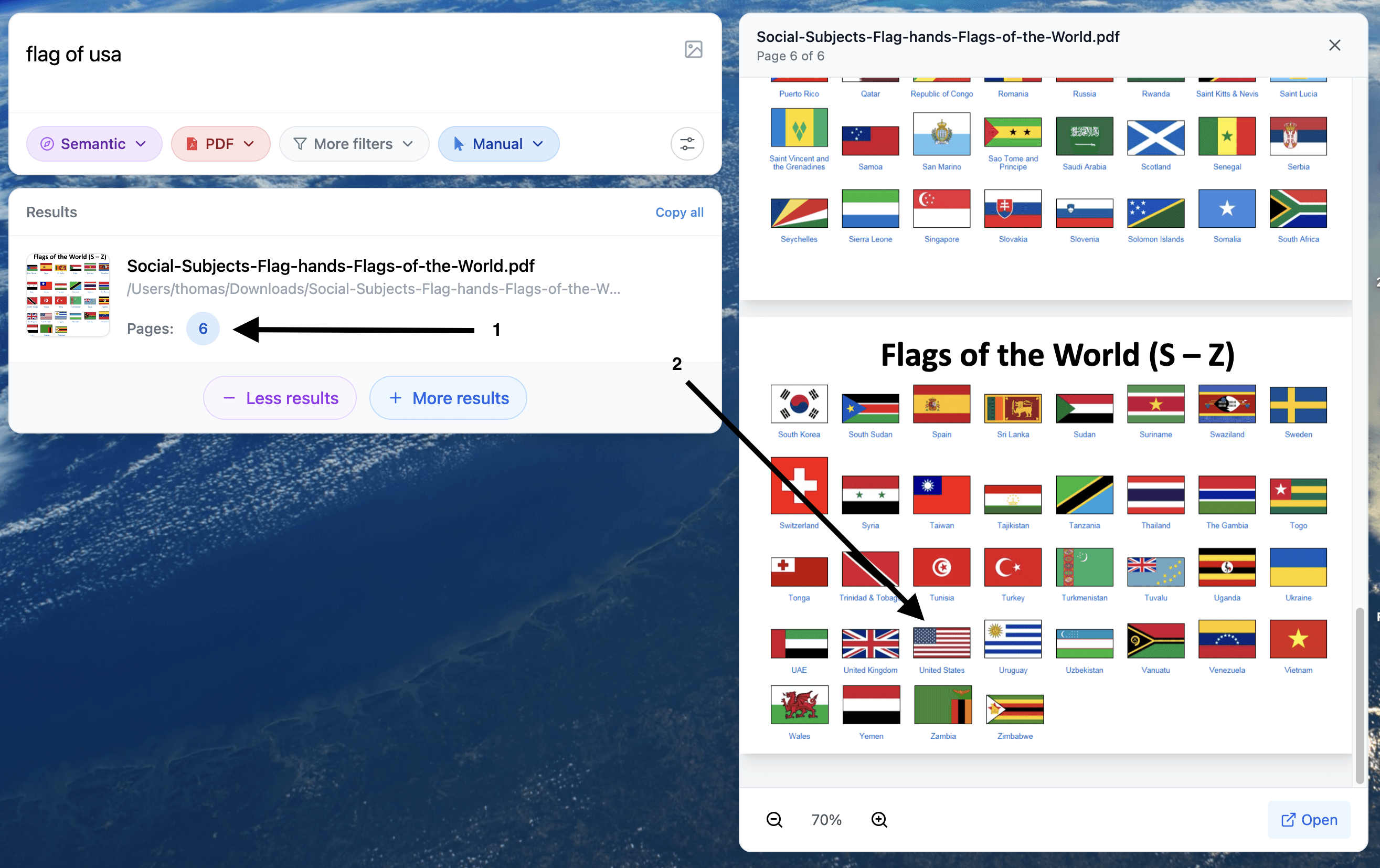
Search for a sentence inside a PDF.
Search for text inside a screenshot.
Search for a topic inside a folder.
Search for a phrase inside an audio recording.
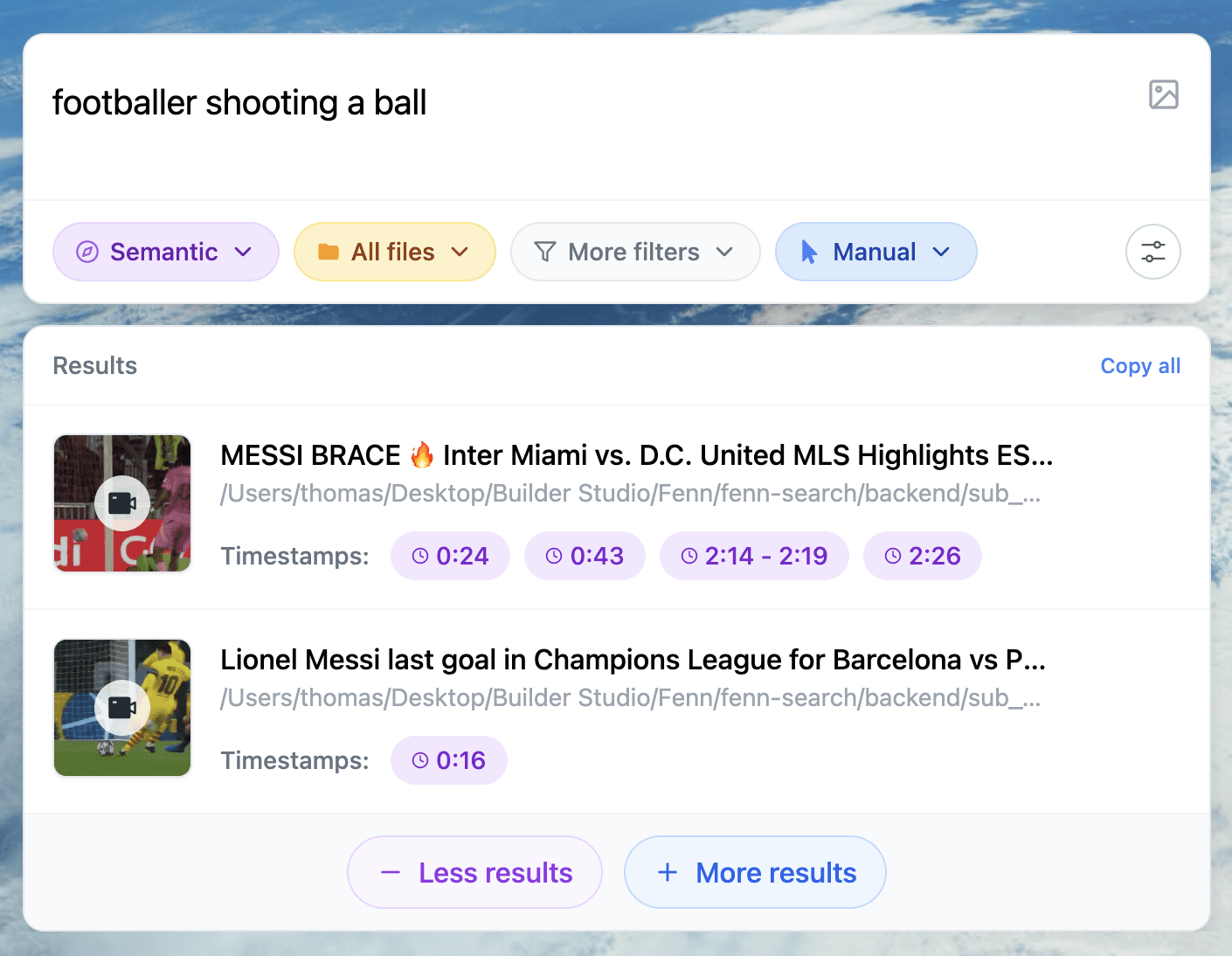
Search for a moment inside a video.
Search for an old email inside a Gmail .mbox archive.
Fenn does not just help you browse files.
It helps you find the thing you remember.
Fenn finds the exact place
This is one of the biggest differences.
Finding the file is useful.
Finding the exact place is better.
Fenn can jump to the exact PDF page, slide, frame, or timestamp where the result appears.
That matters because a file is often just a container.
A 100-page PDF is not the answer.
A two-hour video is not the answer.
A huge email archive is not the answer.
The answer is the exact page, moment, snippet, or timestamp you were looking for.
Privacy is good on both side
This comparison does not need to attack Eagle on privacy.
Eagle says its app database content is saved on the local hard drive, is not publicly available online, and is not uploaded to the web.
That is good.
Fenn also keeps your work local.
The difference is scope.
Fenn is private AI for your whole Mac.
Your files stay on your Mac.
Your index stays on your Mac.
Your searches stay on your Mac.
And that matters because Fenn is not only searching inspiration images.
It can search contracts, invoices, private notes, email archives, videos, audio, screenshots, client files, and business documents.
When Eagle makes sense
Use Eagle if you mainly want a dedicated visual library.
It makes sense for collecting and browsing creative references, design assets, screenshots, fonts, icons, and inspiration.
That is a clear use case.
When Fenn makes sense
Use Fenn if you want to search and organize everything around your work.
Fenn helps you:
search inside 60+ file types
search documents, PDFs, images, audio, and video
search Adobe files
search RAW photos
search Gmail and Google Workspace
.mboxarchivessearch Apple Notes
find exact pages, frames, slides, and timestamps
search by meaning, keyword, exact match, or similarity
chat with files privately
auto-organize folders
find and remove duplicates
rename files with AI
extract file data to CSV
That is much broader than asset management.
The bottom line
Eagle is useful for organizing creative assets.
But asset search is only a small part of file search.
Fenn can help you find images, screenshots, videos, and creative files, then also find the contracts, invoices, briefs, emails, notes, recordings, and PDFs around them.
So the choice is simple.
If you want a visual asset library, Eagle makes sense.
If you want private AI search for your whole Mac, use Fenn.
Download Fenn and find the moment, not the file.
Related reading: