Find RAW Files on Your Mac
Find RAW Files on Your Mac
Photographers and creative professionals rarely lose files.
They lose time trying to find them.
A few years into a photography workflow, your Mac becomes full of RAW files:
.cr2.nef.raf.dng.arw.rw2.orf
And the problem is not storage.
The problem is memory.
You remember:
the mood of the photo
the location
the client
the lighting
the outfit
the subject
the project
the color palette
But you do not remember the filename.
That is where Finder starts failing.
Try Fenn if you want Private AI that finds any RAW file on your Mac using semantic search, not just filenames.
Why finding RAW files becomes painful
At first, photo organization feels manageable.
You create folders like:
Wedding_July_FinalTravel_Italy_2024Client_Shoot_ExportsPortraits_SelectionDSC_4821.ARW
Then the archive grows.
Thousands of files become tens of thousands.
Different cameras create different RAW formats.
Old drives get imported.
Projects get duplicated.
Exports mix with originals.
At some point, searching becomes frustrating.
Because you rarely remember the exact filename.
You remember things like:
“the portrait with blue lighting”
“that snowy mountain shot”
“the black and white street photo”
“the editorial shoot with red clothes”
“the café photo from Tokyo”
“the product shot with a dark background”
Finder is not built for that kind of memory.
Finder still depends too much on filenames
Finder works best when you already know:
the filename
the folder
the exact keyword
the creation date
That is not how photographers remember images.
Creative memory is visual and contextual.
You remember what was inside the image.
Not whether the file was called:
DSC_8842.NEF
or
A7R_EXPORT_FINAL_2.DNG
That is why semantic search matters.
Search RAW files by meaning
Fenn lets you search RAW files using natural language.
Instead of searching only by filename, you can search by what you remember.
For example:
“portrait with warm sunset tones”
“snowy landscape”
“minimal product shot”
“street photography at night”
“dog running on the beach”
“modern office interior”
“woman wearing red jacket”
Fenn indexes the visual content of your files locally on your Mac and makes those searches possible.
That changes the workflow completely.
You stop hunting through folders manually.
You search the way your brain actually remembers images.
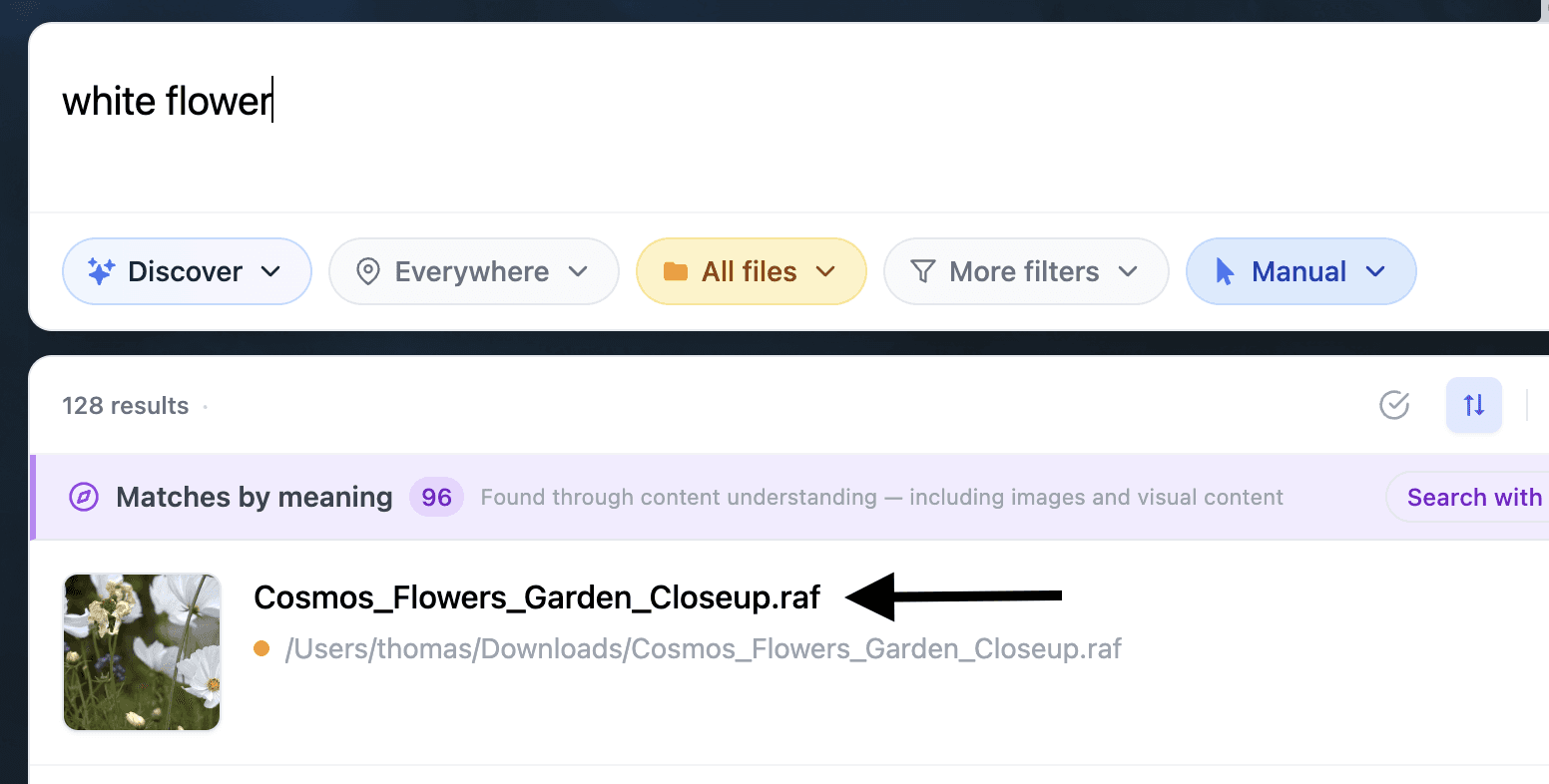
It works across common RAW formats
Fenn supports searching across many popular RAW photo formats, including:
.cr2.nef.raf.dng.arw.rw2.orf
So whether you shoot Canon, Nikon, Fujifilm, Sony, Panasonic, Olympus, or mixed systems, you can search your archive from one place.
Useful for photographers, designers, and creative teams
This is especially useful when your archive spans years of work.
For example:
Photographers
Find old shoots, locations, outfits, compositions, or moods instantly.
Designers
Search inspiration folders visually instead of manually browsing screenshots and references.
Content creators
Find B-roll, product shots, thumbnails, and social assets faster.
Agencies
Search across huge client archives without relying on perfect folder structures.
Freelancers
Recover old work you forgot existed.
A lot of creative work gets buried simply because search tools are too primitive.
Search visually similar images
Sometimes words are not enough.
You may already have one good image and want:
similar photos
similar composition
similar color palette
similar framing
related shots from the same project
Fenn can also help search by similarity.
That means one image can become the starting point to rediscover an entire visual set.
Your RAW archive stays private
This matters more than people realize.
RAW photo archives often contain:
client work
unreleased campaigns
wedding shoots
private events
commercial photography
internal brand assets
Uploading all of that to a cloud AI service is not always acceptable.
Fenn runs locally on your Mac.
Your RAW files stay on your device.
Your searches stay private.
Your archive is not uploaded to a cloud provider just to become searchable.
The real benefit: rediscovering your archive
The biggest benefit of semantic search is not speed.
It is rediscovery.
A lot of photographers already have valuable work buried inside old drives and folders.
The problem is not that the work disappeared.
The problem is that it became impossible to find.
Fenn helps turn old archives into something searchable again.
Not by forcing you to rename every file manually.
But by making the content itself searchable.
The bottom line
RAW archives grow faster than most people can organize them.
And once filenames stop being useful, Finder becomes frustrating.
Fenn lets you search RAW files on your Mac using meaning, visual similarity, keywords, and natural language, all while staying private and local.
So instead of remembering filenames, you can finally search the way you actually remember your photos.
Download Fenn and find the moment, not the file.