Search Inside EPUB Files on Mac (Private and Instant)

Search inside EPUB files on Mac and open the exact passage
You remember the quote, not the ebook name. If your EPUB library is full of “final_v3” filenames, finding one paragraph can take longer than reading it.
Fenn is private AI that finds any file on your Mac. With .epub support, you can search inside ebooks and open the match instantly, without uploading anything to the cloud.
When EPUB search becomes a real problem
If you work with lots of ebooks, you’ve probably said something like:
“I know the exact sentence, but I forgot which ebook it’s in.”
“I need the paragraph that mentions that framework, and I need it now.”
“I have 200 EPUBs, searching them one by one is impossible.”
This hits especially hard for:
Researchers: locating a definition across multiple handbooks and references.
Lawyers and compliance teams: finding a specific clause inside a downloaded guide.
Writers: hunting for a quote, a character detail, or a scene reference.
Students: finding the right section in a textbook before class.
Why typical Mac tools fail for EPUB content
Most “search on Mac” workflows break down with ebooks:
Finder and Spotlight tend to prioritize filenames and metadata, which is not the same as searching inside the book.
Many ebook apps search one open book at a time. That’s fine when you already have the right ebook open, useless when you don’t.
Cloud search creates a privacy tradeoff. If you deal with confidential client material, unpublished work, or sensitive research, uploading your library is often a non-starter.
If Spotlight has been unreliable for you, this guide may help: https://www.usefenn.com/blog/spotlight-mac-ultimate-guide
How to search EPUB files with Fenn
Fenn runs on device, so your EPUB content stays on your Mac. You search with a keyboard shortcut and open results directly at the matching passage.
Quick note on “pages” in EPUBs: EPUB text is reflowable, so page numbers can change depending on font size and window width. Fenn opens the ebook at the exact match location (the passage you searched for), so you land in the right spot immediately.
Step 1: Add your EPUB library
Open Fenn.
Select the folder (or folders) where your .epub files live.
Let Fenn index the content locally on your Mac.
Tip: keep your ebook library in one folder so indexing and results stay tidy.
Step 2: Search inside your ebooks
Use the Fenn keyboard shortcut to open search.
Type a quote, a concept, or a unique phrase.
Choose the search mode that fits your intent:
Keyword when you know the exact wording
Semantic when you remember the idea, not the phrase
Hybrid when you want both recall and precision
Exact when you need strict matches
If you want an overview of how to search keywords effectively on Mac, this is a useful companion: https://www.usefenn.com/blog/how-to-search-keywords-mac
Step 3: Open the exact passage
Click the best result.
Fenn opens the matching ebook at the relevant location, with context around the match so you can confirm it’s the right place.
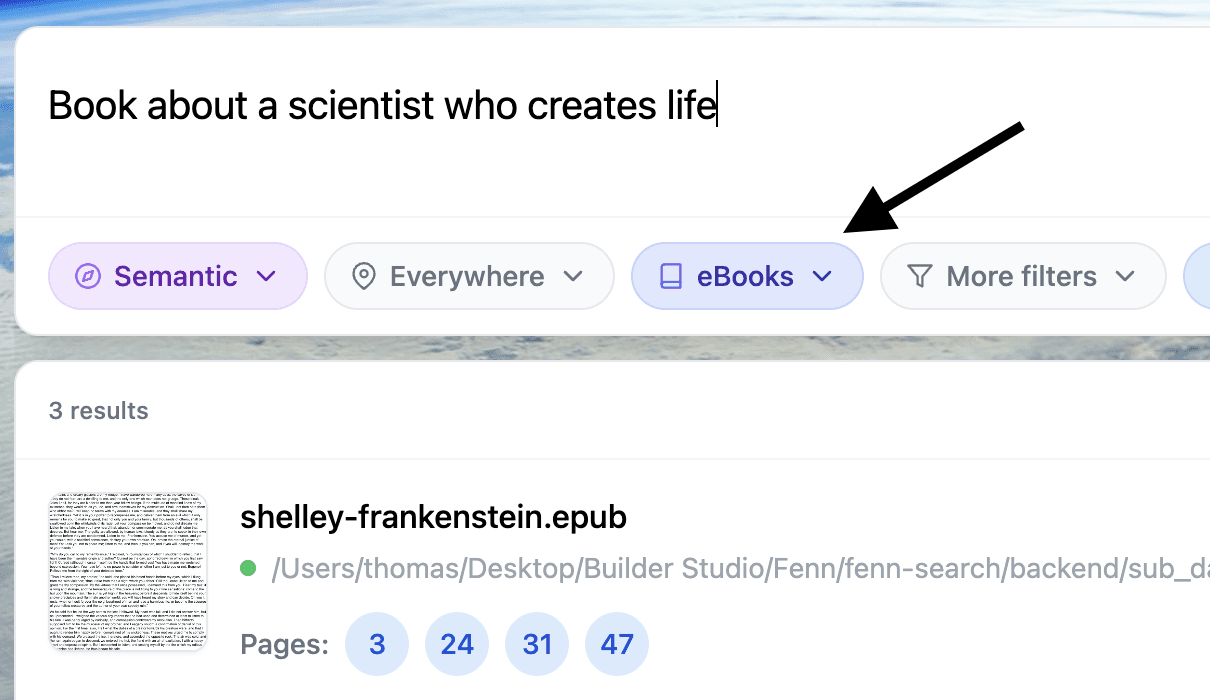
Step 4: Use Agent Search and Chat for harder questions
Some queries are not a single keyword, like:
“the section where the author lists limitations”
“the part comparing approach A vs B”
“the chapter that mentions a counterexample”
Fenn gives you two helpful options:
Agent Search for complex, natural-language searching that needs deeper analysis across content.
Chat when you want a direct answer based on what’s inside your local files.
Your data stays on device either way.
Mini case: finding one sentence across 80 ebooks
Imagine you keep 80 EPUBs locally: reference books, research material, and internal docs. You remember one sentence that perfectly supports what you’re writing, but you can’t remember which ebook it came from.
Without cross-library search, you open ebooks one by one and repeat in-app search over and over. With Fenn, you search once, see which ebook contains the passage, and open it immediately at the match. That’s the difference between “I’ll rewrite it from memory” and “I’ll cite the exact quote with confidence.”
EPUB search that stays private
Fenn is built for people who cannot upload sensitive material to third-party services. Everything happens locally on your Mac, fast on Apple Silicon (macOS Sonoma 14 or later recommended).
If you also work with other formats, these posts are relevant:
Search inside scanned PDFs: https://www.usefenn.com/blog/search-inside-scanned-pdfs-mac
Find text in screenshots and images: https://www.usefenn.com/blog/find-text-in-images-screenshots-mac
Private file search engine for Mac: https://www.usefenn.com/blog/private-file-search-engine-mac
Get Fenn and search your EPUB library today
If you want private, on-device search across ebooks and the ability to open the right result immediately, try Fenn.
Find the moment, not the file.