7 Finder Features Still Missing in macOS 26
7 Finder Features Still Missing in macOS 26
Finder is still the default way to browse files on a Mac.
And for basic tasks, it works.
You can open folders, move files around, rename things, sort by date, and search when you already know roughly what you are looking for.
But if you work with a lot of files every day, Finder still stops far too early.
The problem is not opening files.
The problem is actually finding, understanding, organizing, and using the content inside them.
That is where Finder still feels behind.
Here are 6 features still missing in Finder on macOS 26, and why they matter so much for power users.
Try Fenn if you want private AI that finds any file on your Mac and helps you actually use the content inside it.
1. Search that actually works
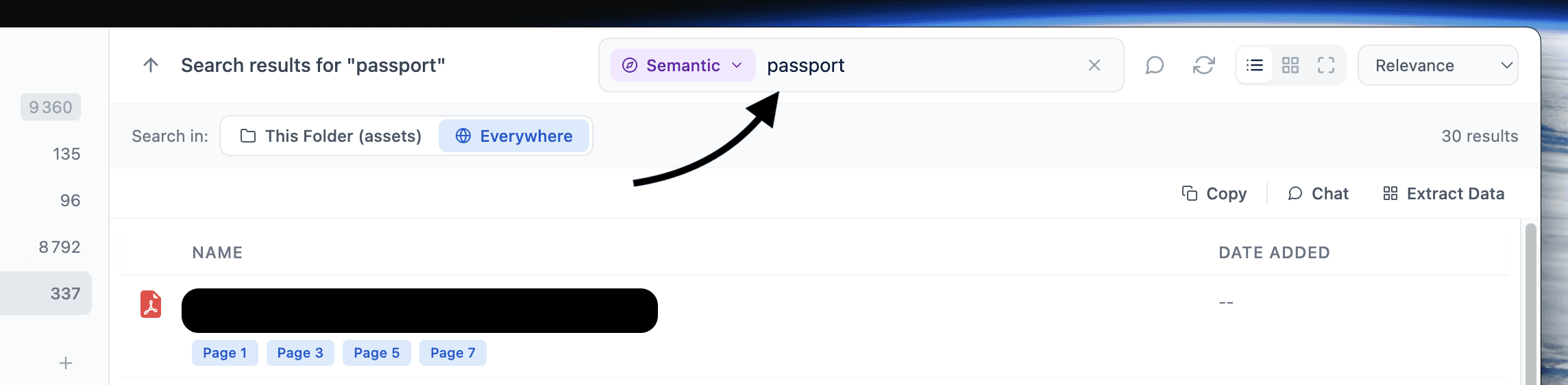
Finder search still works best when you already know the filename, exact keyword, or a narrow set of metadata.
That is not how most people remember things.
In real life, you remember fragments like:
“the PDF about pricing changes”
“that note where I wrote about onboarding issues”
“the screenshot with the refund policy”
“the old deck for that client”
You do not always remember the filename.
You do not always remember the exact word.
Sometimes you only remember the meaning.
That is why real file search should work in multiple ways:
semantic search when you remember the idea
keyword search when you remember the exact wording
filename search when you know the file itself
Finder still does not combine these well enough.
Fenn does.
That is what makes search feel reliable instead of frustrating.
2. Search files by similarity
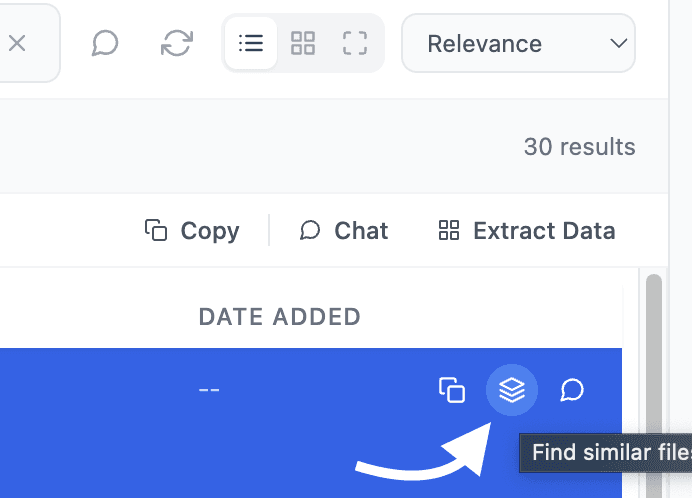
Sometimes the fastest way to find something is not by typing words at all.
Sometimes you want:
a document similar to this one
images like this screenshot
another file like this proposal
related files that match the same subject or pattern
Finder has no real answer for that.
It expects you to search by name, date, tag, or basic text matching.
But similarity search is a completely different workflow.
It helps when you have one good reference and want to find related files quickly.
Once you use it, it feels obvious.
And once you go back to Finder, it feels missing.
3. Chat with files privately
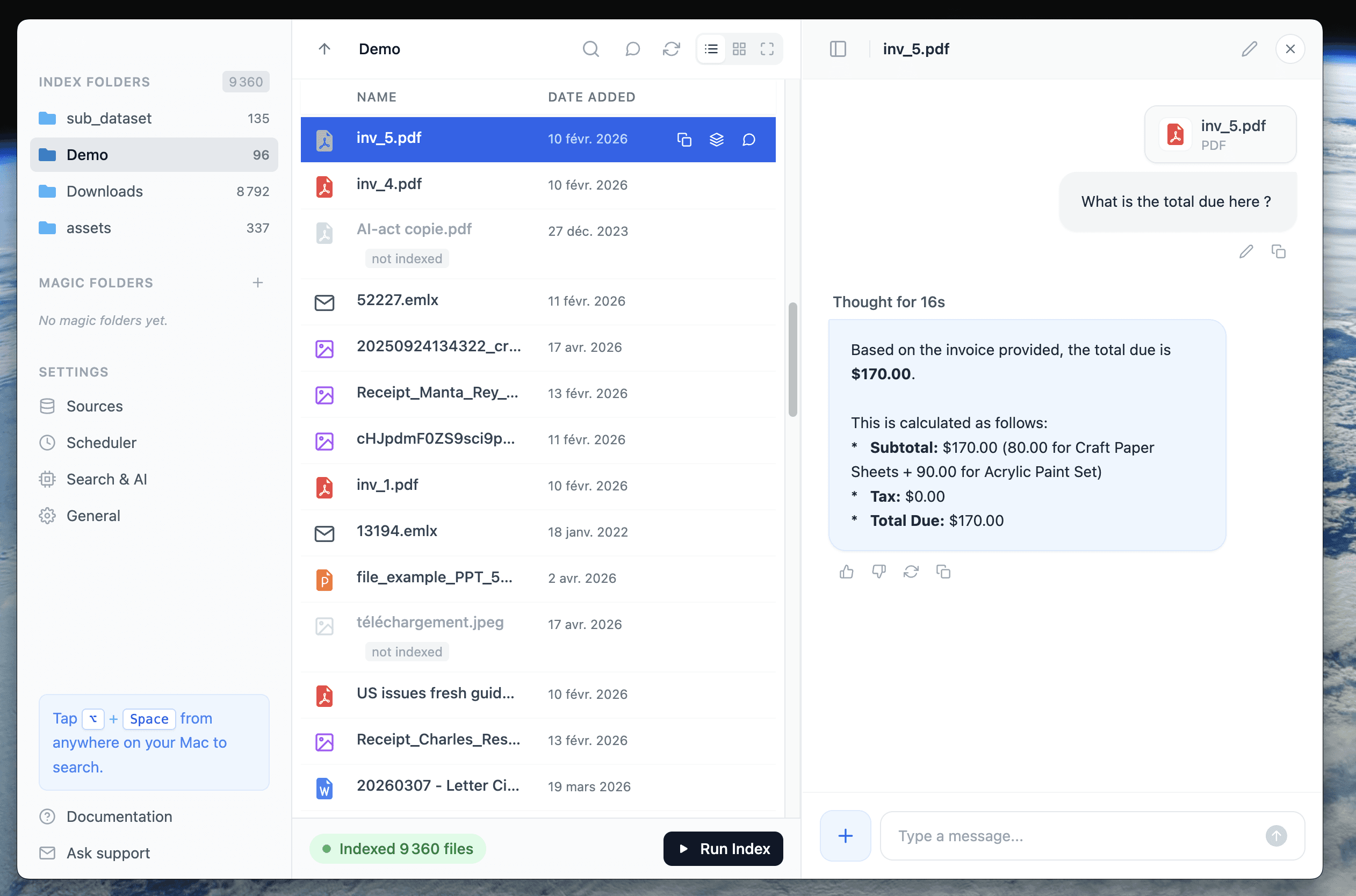
Finder can show files.
It cannot answer questions about them.
That is a big limitation now.
People increasingly want to ask things like:
“summarize this contract”
“what changed across these reports?”
“which file mentions this client?”
“what receipts mention this merchant?”
“what does this folder say about taxes or pricing?”
Finder is still a browsing tool.
It is not a file intelligence layer.
Fenn lets you chat with your files privately on your Mac, which means you can ask questions about your own content without sending your archive somewhere else.
That is not just more convenient.
It is a completely different way to work.
4. Extract text and transcription from audio and video
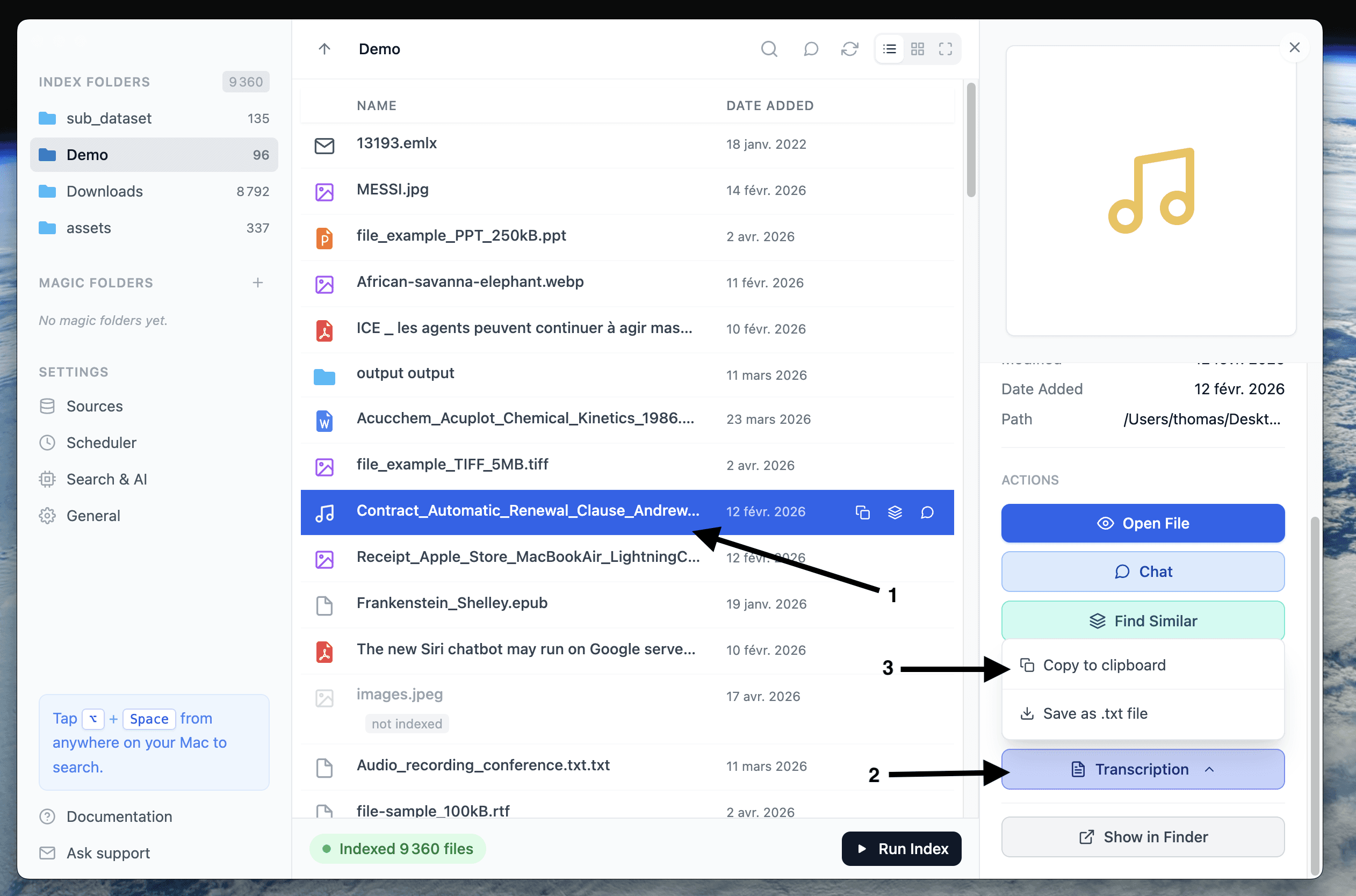
A lot of important information no longer lives only in documents.
It is inside:
meeting recordings
interviews
voice notes
podcasts
screen recordings
video archives
Finder can locate the file.
But it cannot tell you what was said inside it.
That means if you are looking for one sentence in a 40-minute recording, Finder is basically useless.
You still have to play the file manually and scrub through it.
Fenn can extract transcription from audio and video, then make that content searchable.
That means spoken information becomes usable, not buried.
5. Auto-organize folders
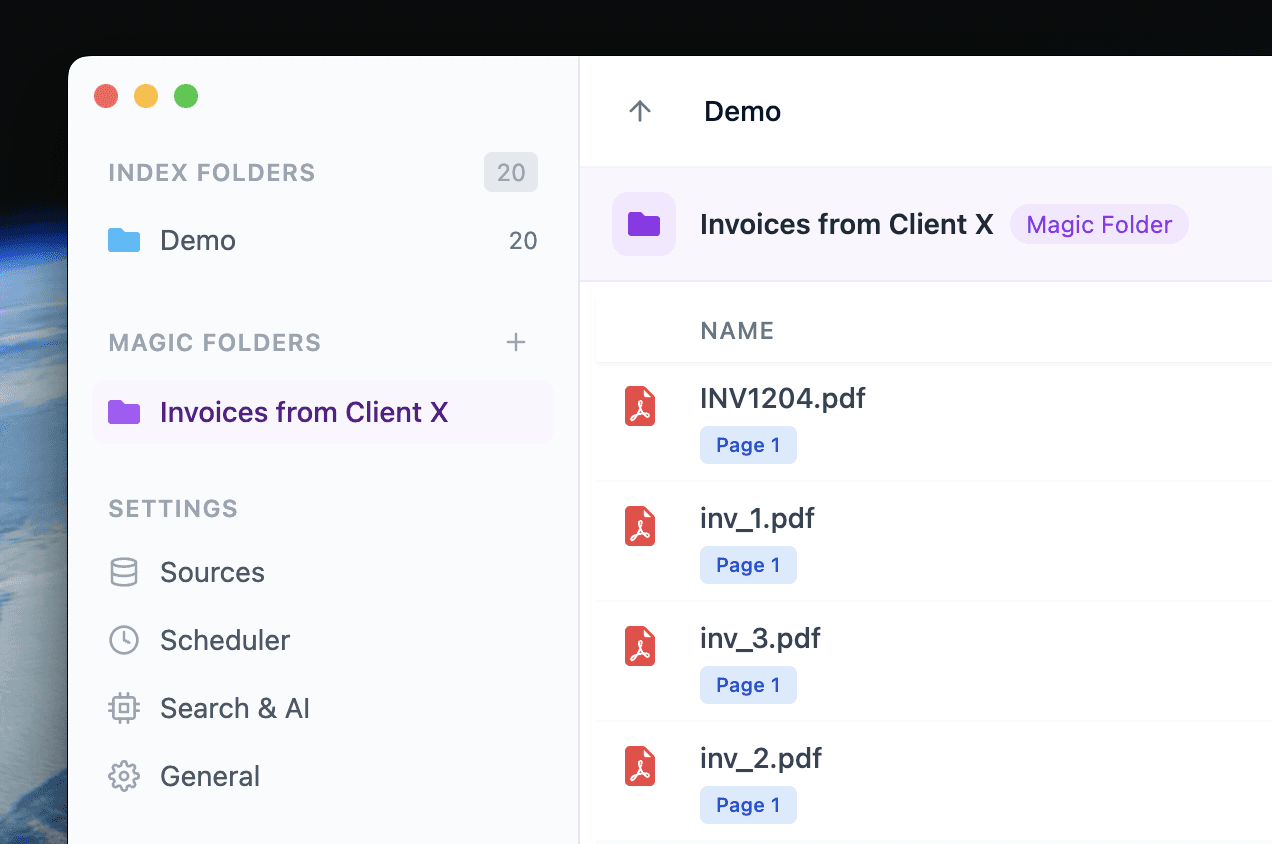
Finder gives you folders.
It does not help much once they start turning into chaos.
And most folders do turn into chaos.
Downloads, screenshots, exports, client files, scans, PDFs, old notes, recordings, random drafts. After a while, structure breaks down.
That is why auto-organization matters.
Not just moving files around manually, but actually helping folders stay clean over time.
Fenn’s Magic Folders solve this in a much more practical way than Finder does.
Because the problem is not creating folders.
The problem is keeping them useful.
6. Extract data from any file to CSV
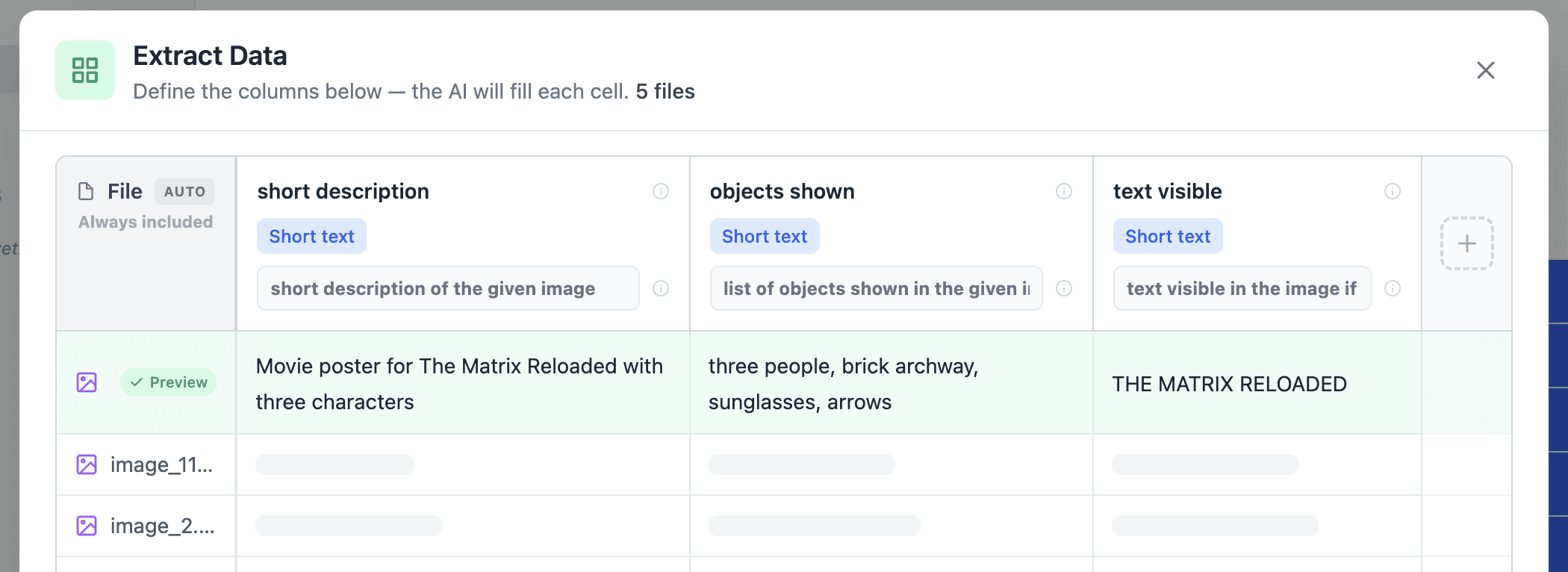
This is one of the biggest missing features of all.
A lot of files contain useful data, but not in a format you can actually work with.
For example:
receipts with total and tax
invoices with dates and amounts
PDFs with names and fields
images that need descriptions
documents full of structured information
audio or video that contains details you want in a table
Finder can help you locate the file.
It cannot turn that messy file into usable structured output.
Fenn can extract data from unstructured files and turn it into CSV.
That opens a lot of real workflows:
receipts to spreadsheet
image descriptions in bulk
PDFs to import-ready data
mixed files to structured rows and columns
This is where file management becomes actual productivity.
7. Rename files with AI
Bad filenames make everything harder.
Your Mac is probably full of files called things like:
IMG_4821.pngscan_final_2.pdfrecording_0312.mp3export_v4.movuntitled document.docx
Finder lets you rename files manually.
But it does not understand what is inside them well enough to suggest useful names automatically.
That matters because the best filename is often based on the content, not the file type or creation date.
Fenn can rename files with AI by looking at what the file actually contains.
That means screenshots, PDFs, recordings, videos, documents, and other files can get names that are easier to understand later.
Instead of reopening a file just to remember what it is, you can scan a folder and know what matters.
Good filenames are not just cosmetic.
They make your whole Mac easier to search, browse, and trust.
The bigger problem
Finder is still built around containers.
Files. Folders. Views. Sorting.
But modern work is about content.
You need more than file browsing.
You need to:
search by meaning
search by exact keyword
search by filename
find similar files
ask questions about content
transcribe audio and video
organize folders automatically
extract usable data from messy files
That is the layer Finder still does not provide.
The bottom line
Finder still works for basic file browsing.
But for anyone who deals with lots of files, it is missing the intelligence layer that modern Mac workflows now need.
That missing layer includes:
search that actually works
similarity search
private chat with files
transcription from audio and video
auto-organizing folders
structured data extraction to CSV
That is exactly the gap Fenn is built to fill.
Download Fenn and find the moment, not the file.