File Intelligence on Your Mac

File Intelligence on Your Mac
You remember the clause, not the filename. You remember the slide, not the deck. You remember the moment someone said it, not which recording it was.
If you work with lots of files, your Mac is already a knowledge base. The problem is that macOS still makes it painfully hard to search what’s inside everything, across folders, formats, and years, then jump to the exact page, frame, or timestamp you need.
That missing layer is File Intelligence.
What “File Intelligence” means (and why you feel the gap)
File Intelligence is not another chatbot window. It is a system layer that can:
Index the content inside your real working files (not just titles and metadata)
Understand mixed formats (PDFs, slides, spreadsheets, screenshots, scans, audio, video)
Retrieve precisely, then open the exact spot inside the file (page, slide number, timestamp)
Work locally for privacy, because your files are confidential by default
If you are a lawyer, it’s finding the paragraph inside a 300-page PDF that mentions a carve-out.
If you are a researcher, it’s retrieving a figure caption you saw months ago in a pile of papers.
If you are in finance, it’s jumping to the timestamp in an earnings call where guidance changed.
If you are an operator, it’s pulling the one screenshot that contains the settings you used last time.
This is a different job than “help me rewrite this email.”

Apple Intelligence is useful, but it is not File Intelligence
Apple Intelligence is positioned as a “personal intelligence system” with systemwide help for writing, communicating, and generating content. Apple highlights Writing Tools, improvements to Siri, image generation features, and a ChatGPT handoff when needed.
That is valuable. It is also a different category than “search across my entire disk, inside every file type I use, and take me to the exact spot.”
Think of it like this:
Apple Intelligence: helps you create, rewrite, summarize, and assist in the moment across apps and system experiences.
File Intelligence: helps you retrieve and ground your work in your actual corpus, across years of files, with precise navigation to the right place inside them.
What Apple Intelligence does well
Based on Apple’s own documentation, Apple Intelligence focuses on things like:
Writing Tools to rewrite, proofread, and summarize text across many places you write (including third-party apps and websites).
App and system experiences like summaries in Safari, suggested organization in Reminders, and Shortcuts actions that tap Apple Intelligence models.
ChatGPT integration inside Siri, Writing Tools, and other experiences, with user control over when information is shared.
Privacy architecture that emphasizes on-device processing plus Private Cloud Compute for some requests that need larger models.
What Apple Intelligence does not currently promise
In Apple’s public pages, Apple Intelligence is described as writing, communication, and generative assistance. It is not described as a universal, cross-format “find anything inside my files and jump to the exact moment” layer for your whole Mac.
So if your core pain is retrieval across messy, real-world files (PDFs, scans, screenshots, meeting recordings, screen captures, videos), you still need a dedicated File Intelligence layer.
Why typical Mac search still fails at “the moment, not the file”
Even with improvements, most Mac search workflows break down in one of these ways:
They over-rely on filenames and metadata
You do not name files consistently when you are moving fast.They return a file, not the answer
Finding “the PDF” is step one. You still have to scroll and hunt.They do not handle modern work formats well
Screenshots, scanned PDFs, long slide decks, audio, video, and mixed-format project folders are where context goes to die.They make privacy tradeoffs
Uploading confidential client docs, contracts, or financials to a cloud AI is often not allowed.
How to add File Intelligence to your Mac with Fenn
Fenn is Private AI that finds any file on your Mac. It is built specifically for this missing layer: searching inside content and opening the exact moment inside your files.
Step 1: Choose what Fenn should index
Pick the folders or sources where your real work lives (clients, projects, downloads, research, meeting recordings).
Fenn indexes locally, on your Mac, so your data stays on-device.
Step 2: Let it build an on-device index
Indexing can take a bit depending on how much you have. The difference is what happens after: you get retrieval that is built for real work, not just filenames.
Step 3: Search the way you actually remember things
Fenn supports multiple ways to search, depending on the situation:
Keyword search when you remember exact terms
Semantic search when you remember the idea, not the wording
Hybrid mode when you want the best of both
Exact mode when precision matters most
Agent search for complex queries that need analysis
Chat mode when you want a direct answer from your files
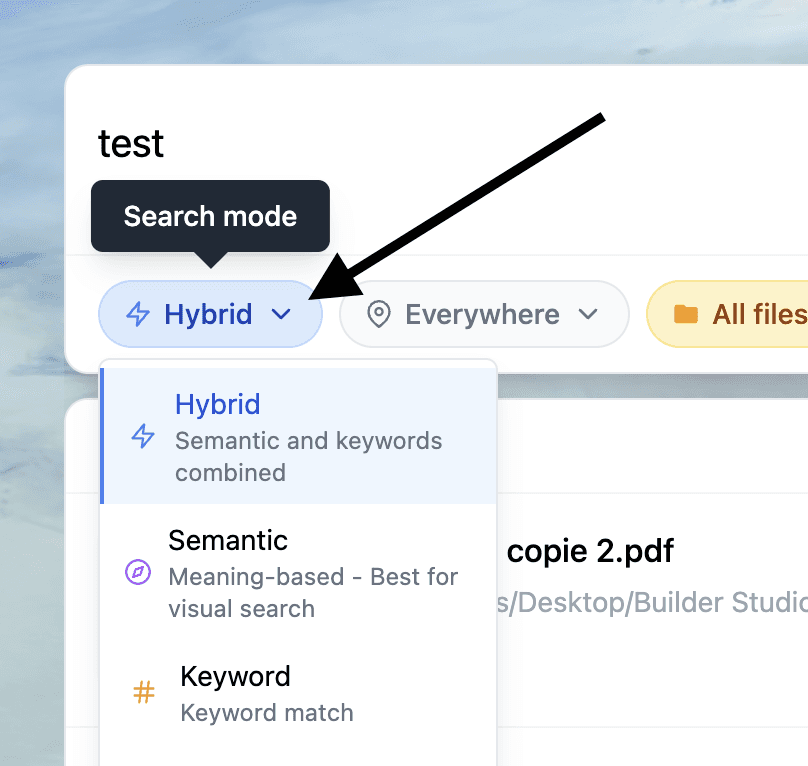
Search mode selection

Example of a simple agentic search
Step 4: Jump straight to the exact spot inside the file
This is the “File Intelligence” payoff.
Instead of: find file → open file → scroll → search inside → repeat
You get: search → result → open at the page, slide number, timestamp, or frame.
That last part is what turns “I have the file somewhere” into “I have the answer now.”

Mini case: the difference between “found it” and “done”
A consultant is preparing for a client call. They remember a specific limitation from a contract and a number from a slide, but not where either lives.
Without File Intelligence:
They search Spotlight, open 5 similar PDFs, skim, run in-document search, and still miss it.
They burn 20 minutes and show up uncertain.
With Fenn:
They search the idea in semantic or hybrid mode.
They open the exact page in the contract where the limitation appears.
They jump to the exact slide where the number is shown.
They walk into the call grounded in the source material.
This is not “AI that writes for you.” It is AI that retrieves what you already know you have.
File Intelligence vs Apple Intelligence (a practical way to think about it)
Use Apple Intelligence when:
You want to rewrite, summarize, or polish text in the flow of work.
You want help inside Siri, system experiences, and supported app contexts.
Add File Intelligence when:
The bottleneck is finding the source, not rewriting the output
The knowledge is trapped in PDFs, decks, screenshots, scans, recordings, and project folders
You need auditability: “show me where this came from”
You need privacy: keep everything on your Mac
They can complement each other, but they are not substitutes.
The bottom line
Apple Intelligence improves how you write and communicate across your apps.
File Intelligence improves how you retrieve and navigate your real working knowledge across your files.
If your day is built on documents, decks, screenshots, PDFs, calls, and recordings, you need the second layer.