Search Your Old Files on Mac
Search Your Old Files on Mac
You know the file exists.
You know it was on your Mac at some point.
Maybe it is in an old archive folder. Maybe on an external drive. Maybe buried inside a folder called “Old”, “Archive”, “Backup”, or “2017”.
You do not remember the filename anymore.
You barely remember the format.
You just remember a sentence, a project name, a client, or a slide.
That is exactly where normal Mac search starts to fail.
And it is exactly why more people are starting to use Fenn to recover files that feel lost, even though they were sitting on their Mac the whole time.
Your old files are often not gone. They are just unfindable.
Most people do not really lose files.
They lose the ability to find them.
That is what happens when years of old work pile up across:
archive folders
external drives
desktop backups
old client projects
exported presentations
forgotten notes
legacy file formats
The files are still there.
The problem is that the path back to them is broken.
You may remember:
one phrase from the document
the client name
a rough date
a topic that was mentioned
the fact that it was probably in an old Word or PowerPoint file
But Finder and Spotlight usually expect something much more exact.
They want filenames, obvious keywords, or recent context.
That is not how memory works.
Old archives are where valuable knowledge goes to disappear
This is especially true for long-time Mac users.
Over the years, you accumulate:
.rtfnotesold
.docor.xlsfileslegacy
.pptpresentationsexported reports
folders copied from older Macs
project archives from previous jobs or clients
A lot of this material still matters.
It may contain:
old agreements
research notes
meeting decks
pricing information
product decisions
useful writing you forgot you had
But because it lives in older formats or deep archive folders, it becomes practically invisible.
Not deleted. Invisible.
Why normal Mac search struggles with old files
The problem is not only volume.
It is precision.
When you are looking for something from years ago, you usually do not have the filename. You often do not even know the exact folder.
You are searching from memory.
That is where normal Mac tools tend to break down.
Common problems include:
old files buried in deeply nested folders
weak results for legacy document formats
too much reliance on filenames and metadata
no easy way to search by meaning or vague memory
poor visibility into content that feels “archived” and forgotten
We covered part of that broader problem in Find Any Lost Mac File Even If You Forgot the Name: The Secret is Semantic Search and Your Mac Is a Mess. Here’s How to Find Any File Anyway.
The archive problem is the same issue, just worse.
Legacy file support matters more than people think
This is why support for older file types matters.
A lot of important work still lives in formats like:
.rtf.doc.ppt.xls
Not because anyone loves those formats today.
But because years of real work were created in them.
And if your search tool ignores them, then part of your own knowledge becomes harder to access.
With Fenn, those older files do not have to stay buried.
You can index them like the rest of your Mac and search across them privately, alongside modern files.
That changes the experience completely.
Instead of thinking:
“I know I wrote this somewhere around 2016... maybe in an old folder... maybe a Word doc...”
You can just search for the idea, phrase, or context you remember.
How to search old files on Mac with Fenn
The workflow is simple.
1. Add the folders that contain your old archives
This can be an archive folder, an external drive, an old project directory, or any folder where older documents live.
If part of your history lives on external storage, this pairs well with How to Search Instantly on External Drives on Mac with Fenn.
2. Let Fenn index the content
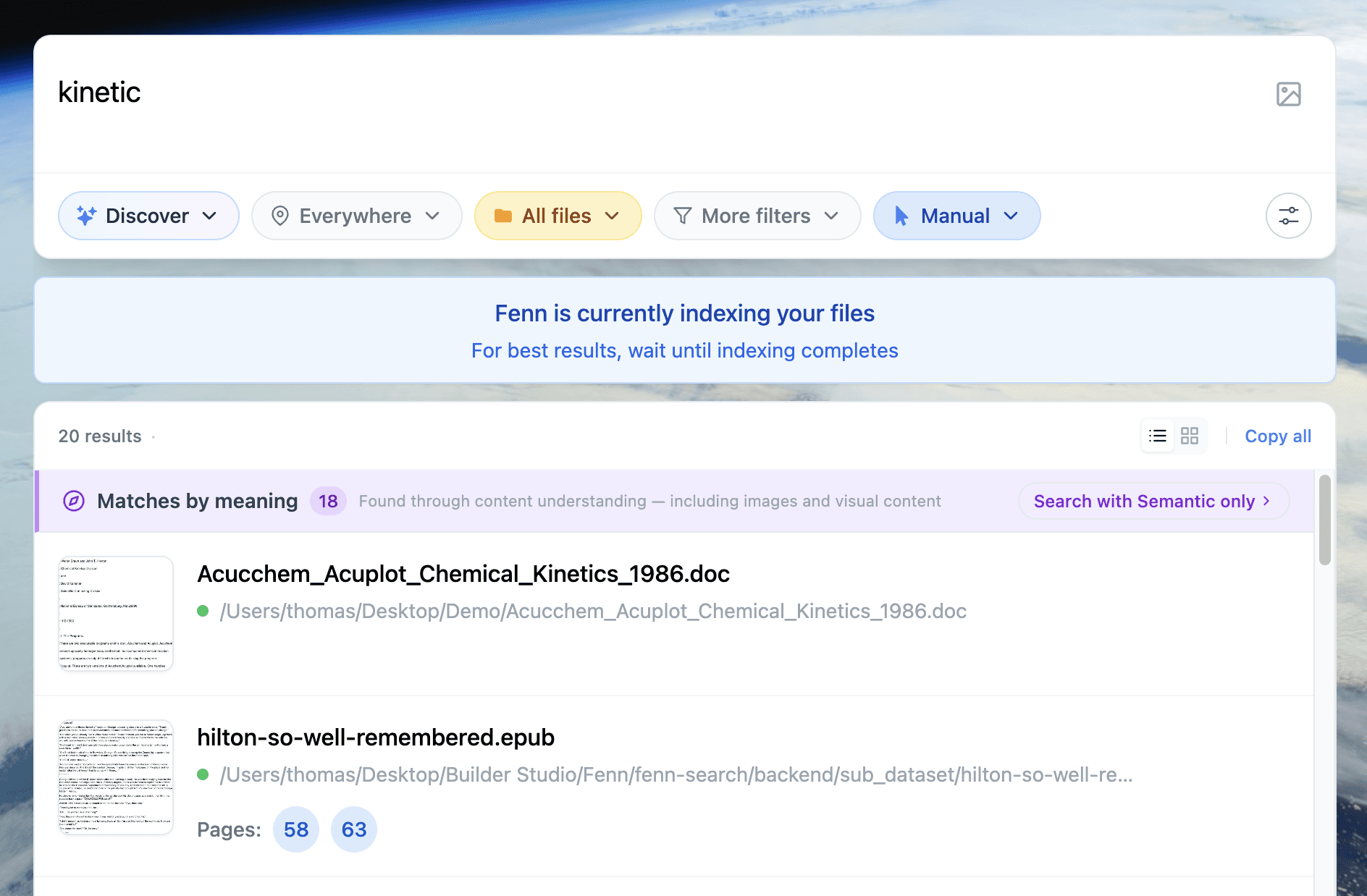
Fenn indexes the content inside your files, including older document types, so you are not limited to filenames.
3. Search from memory
Search the phrase, topic, project, person, or detail you actually remember.
That might be:
a sentence from an old note
a company name from a 2013 deck
a product term from an archived proposal
a rough description of what the document was about
4. Open the right result fast
Instead of hunting through archive folders manually, you can jump straight to the file that matches what you meant.
That is the real upgrade.
This is where archive folders become useful again
Most archive folders are created with good intentions.
“Let’s keep everything, just in case.”
But later, they become digital storage boxes with no index, no map, and no practical retrieval.
Fenn changes that.
It turns old folders from dead storage into searchable knowledge.
That matters more than people think.
Because your old files are often full of:
previous decisions
reusable writing
business history
reference material
client context
creative work you forgot existed
That is not clutter.
That is value you cannot access yet.
A common example
Let’s say you vaguely remember an old presentation from years ago.
You do not remember the filename.
You do not remember the folder.
You only remember that it mentioned a specific customer problem and had a slide about pricing.
If that file is buried in an old .ppt inside a long-forgotten archive folder, normal search can be painful.
With Fenn, you search for the idea you remember, not just the filename you forgot.
That is the difference between searching storage and searching knowledge.
Why this matters for professionals
This is especially useful for people who have been working on a Mac for years.
Lawyers, consultants, researchers, designers, founders, and finance teams often have huge archives of valuable material that become harder to search over time.
And the older the archive gets, the worse the problem becomes.
Not because the files disappeared.
Because the search layer never kept up.
If that sounds familiar, you may also like How to Find Anything on a Mac Without Using Finder or Spotlight.
The bigger point
Old files should not become dead files.
Archive folders should not become black holes.
And legacy formats should not make your own work harder to recover.
If the file is still on your Mac, it should still be findable.
That is the standard.
Find old files before they stay lost forever
The frustrating part about old files is that you often stop looking before you stop needing them.
At some point, “hard to find” becomes “basically lost”.
Fenn helps fix that.
It lets you search old files, archive folders, and legacy formats privately on your Mac, so valuable work does not disappear just because time passed and filenames got forgotten.
Download Fenn and find the moment, not the file.