What Is a Magic Folder on Mac?
What Is a Magic Folder on Mac?
A normal folder waits for you.
You create it.
You name it.
You drag files into it manually.
Then, slowly, it gets outdated.
That is how folders have worked on Mac for years.
But what if a folder could keep itself updated?
What if you could say:
“Keep all InDesign and Images files about Project X here.”
And the folder would always show the right files, even as new ones appear on your Mac?
That is the idea behind Magic Folders in Fenn.
A Magic Folder is a self-updating folder

Example of a Magic folder to retrieve all invoices from the client Yoga Studio
A Magic Folder is not just a folder you fill once.
It is a live collection of files based on what you want inside it.
Instead of manually dragging files into a folder, you define the rule or topic.
For example:
all InDesign files about a specific project
all PDFs related to a client
all presentations about a product launch
all screenshots mentioning a campaign
all documents about a legal case
all videos related to a creative project
Fenn then keeps that folder updated as it finds matching files.
That means the folder stays useful without you constantly maintaining it.
Why normal folders break down
Folders are simple, which is why they are useful.
But they have one big problem:
They depend on you.
If you forget to move a file, the folder becomes incomplete.
If you save something in the wrong place, you lose track of it.
If a project spans PDFs, screenshots, InDesign files, videos, and documents, one folder rarely captures the full picture.
That is why many Mac folders slowly become outdated.
They reflect where you put files, not what the files are about.
How Magic Folders are different
Magic Folders work from meaning and criteria, not manual placement.
You can create a folder around the files you want to see together.
For example:
“All InDesign files about the summer campaign.”
or
“All pdf invoice files from the client Yoga Studio.”
Fenn can search across your Mac, find matching files, and keep that collection available inside the Fenn UI.
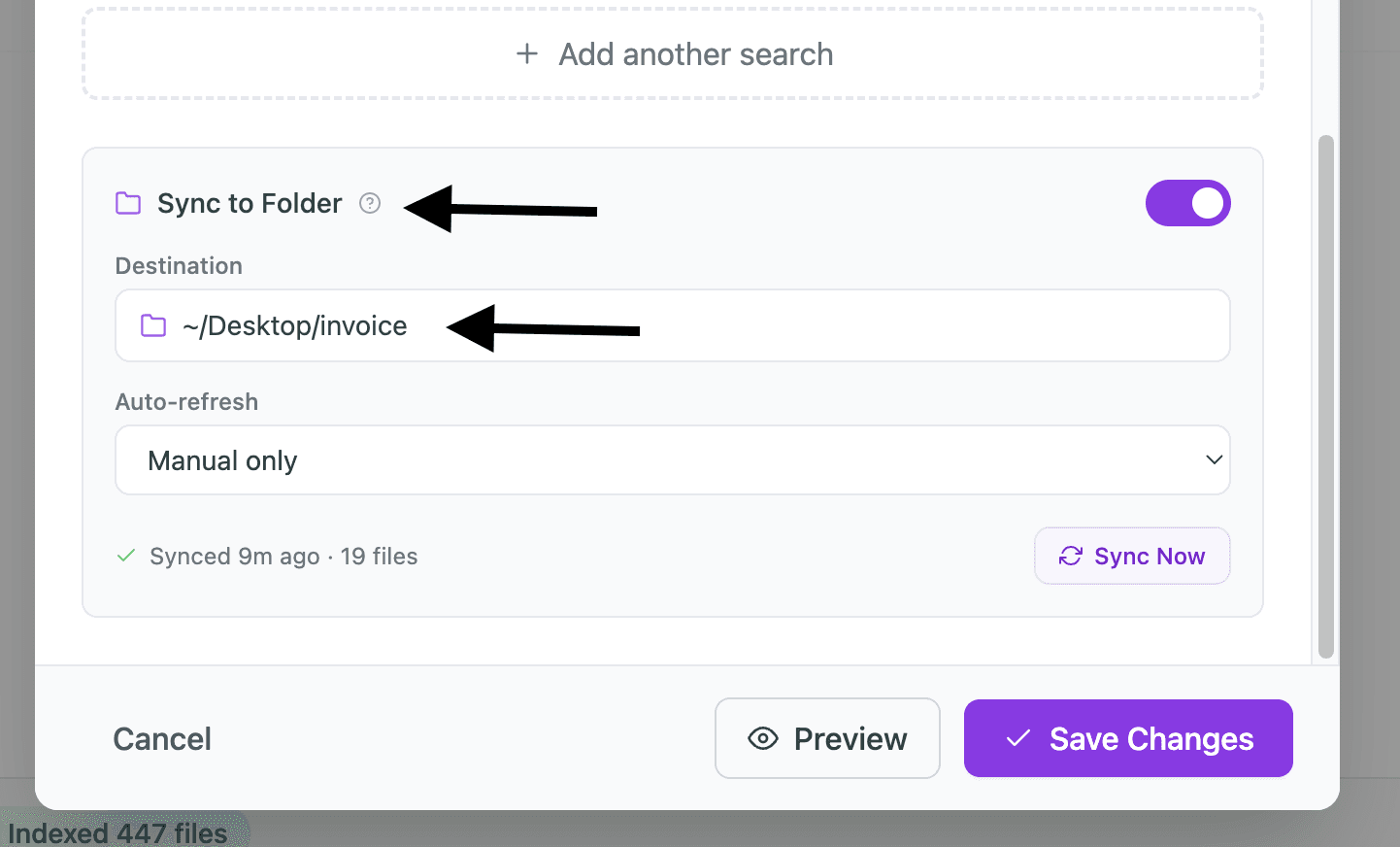
And if you want the folder to feel more native, you can also sync the Magic Folder with a real folder in the file system.
That means you do not have to open Fenn every time.
You can see the content directly from Finder.
A practical example
Imagine you are a designer working across dozens of client folders.
You have:
exported PDFs
screenshots
image references
old drafts
final versions
archived project folders
Now you need to collect all InDesign files related to one brand refresh.
Normally, you would search manually, open folders, check filenames, and move files one by one.
With a Magic Folder, you can create a live folder for that project.
Fenn finds the matching files and keeps the folder updated.
So instead of building the folder manually, you define what belongs there.
That is the difference.
Magic Folders are useful when your files are spread everywhere
This is where Magic Folders become valuable.
They are not just for people with messy folders.
They are for people whose work naturally spans many places.
For example:
designers with project assets across old folders
consultants with client files in multiple archives
founders with decks, notes, screenshots, and PDFs everywhere
lawyers with documents related to the same case
researchers with papers, notes, and references across folders
The problem is not always bad organization.
Sometimes the same topic simply lives across many file types and locations.
Magic Folders help bring those files together.
Private by design
A Magic Folder can contain sensitive work.
Client files. Design drafts. Internal documents. Contracts. Financial PDFs. Private notes.
That is why Fenn is built to run locally on your Mac.
Your files stay on your Mac.
Your searches stay on your Mac.
Your Magic Folders are created from local indexing, not by uploading your archive to a cloud AI provider.
That matters if your folder contains work you cannot send anywhere else.
The bottom line
A normal folder contains the files you manually put inside.
A Magic Folder contains the files that match what you actually want.
That makes it feel less like storage and more like a living view of your work.
With Fenn, you can create self-updating folders based on file type, topic, metadata, or custom instructions, then view them in Fenn or sync them to a real folder in Finder.
That is what folders on Mac should feel like.
Download Fenn and find the moment, not the file.