Your ChatGPT Backup Plan: Offline AI on Your Mac

Your ChatGPT Backup Plan: Offline AI on Your Mac
ChatGPT is down. Or slow. Or rate-limited. Or blocked behind a plan you do not have.
If AI is part of how you work, that is not a small inconvenience. It is a productivity outage.
Here is the good news: you do not need to depend on OpenAI, Google, or Anthropic to keep using AI.
You can work with AI directly on your Mac, offline, with your files staying private.
Why “cloud-only AI” is a fragile workflow
Most people use AI like a website. That means your ability to work depends on someone else’s servers and rules.
Common failure modes:
Outages and slowdowns when demand spikes
Rate limits and paywalls that block the model you rely on
Policy changes that suddenly refuse a normal request
Data risk when you paste sensitive content into a third-party service
Long-term lock-in, where your workflow only works inside one vendor’s product
If you do professional work, especially with confidential information, that is a risky foundation.
What an AI backup plan should actually do
A good backup plan is simple:
It works even when the internet or a provider is down.
It works on your real work, meaning your documents and files.
It keeps sensitive information private by default.
For most people, the biggest pain is not “writing help.” It is retrieval.
You remember the clause, not the filename. You remember the slide, not the deck. You remember the moment, not which recording.
When cloud AI is down, that problem does not go away. It gets worse.
The better approach: AI that works on your Mac, with your files
This is where Macs have a real advantage in 2026. Apple Silicon makes private, on-device AI workflows practical for normal people, without needing an IT project.
But the key is choosing the right kind of AI.
Most “AI apps” are still cloud apps with a nicer interface.
What you want is a private intelligence layer that works locally and helps you do the daily tasks that actually matter:
find the right file fast
search inside long PDFs and decks
pull information from your files without uploading them anywhere
jump to the exact page, slide, or timestamp where the answer lives
Fenn is the simplest “ChatGPT backup plan” for file work
Fenn is Private AI that finds any file on your Mac.
It is built for the exact situation professionals face when cloud AI is unavailable or not allowed.
With Fenn you can:
Search inside your real files (PDFs, docs, slides, spreadsheets, screenshots, scans, audio, video)
Open results at the exact moment, like a specific page, slide number, timestamp, or frame
Use Agent search for complex queries
Use Chat mode to ask questions grounded in your files
Keep your data on-device, so your confidential documents are not sent to OpenAI, Google, or Claude
That means your workflow does not depend on cloud uptime.
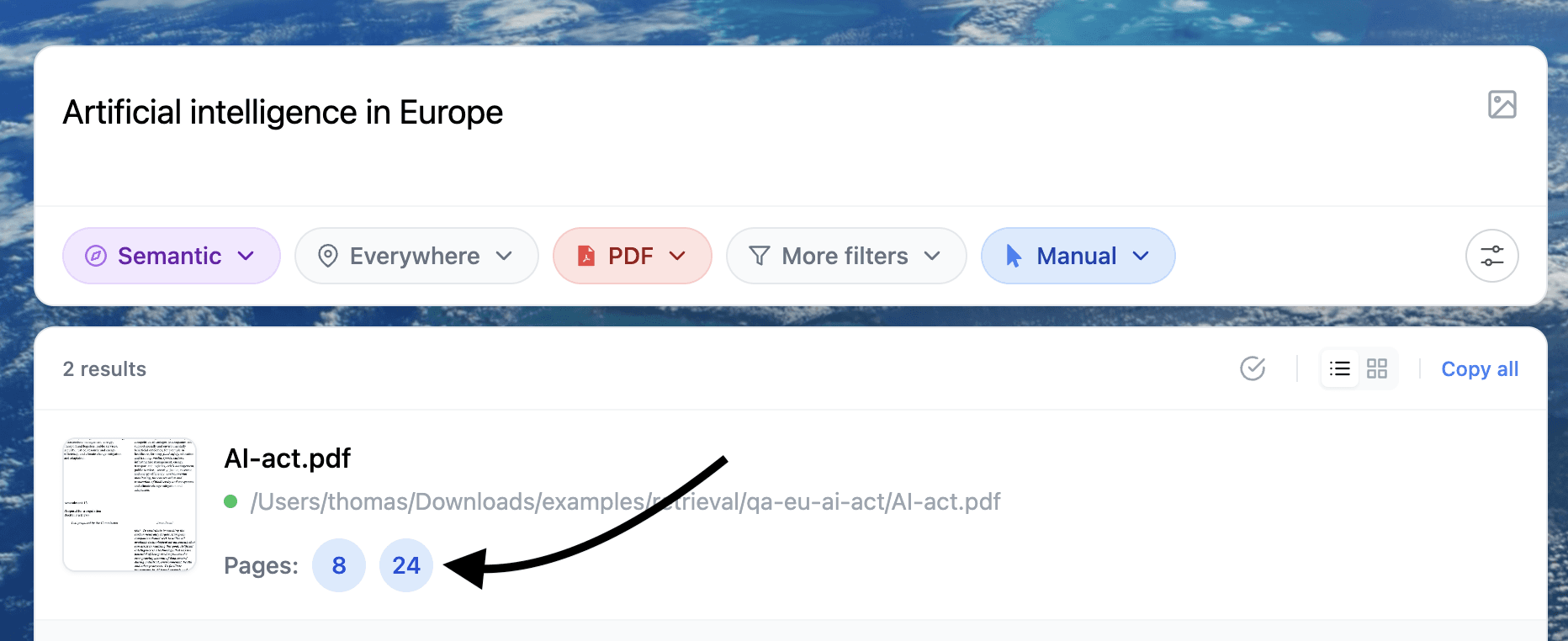
Example of search inside a document
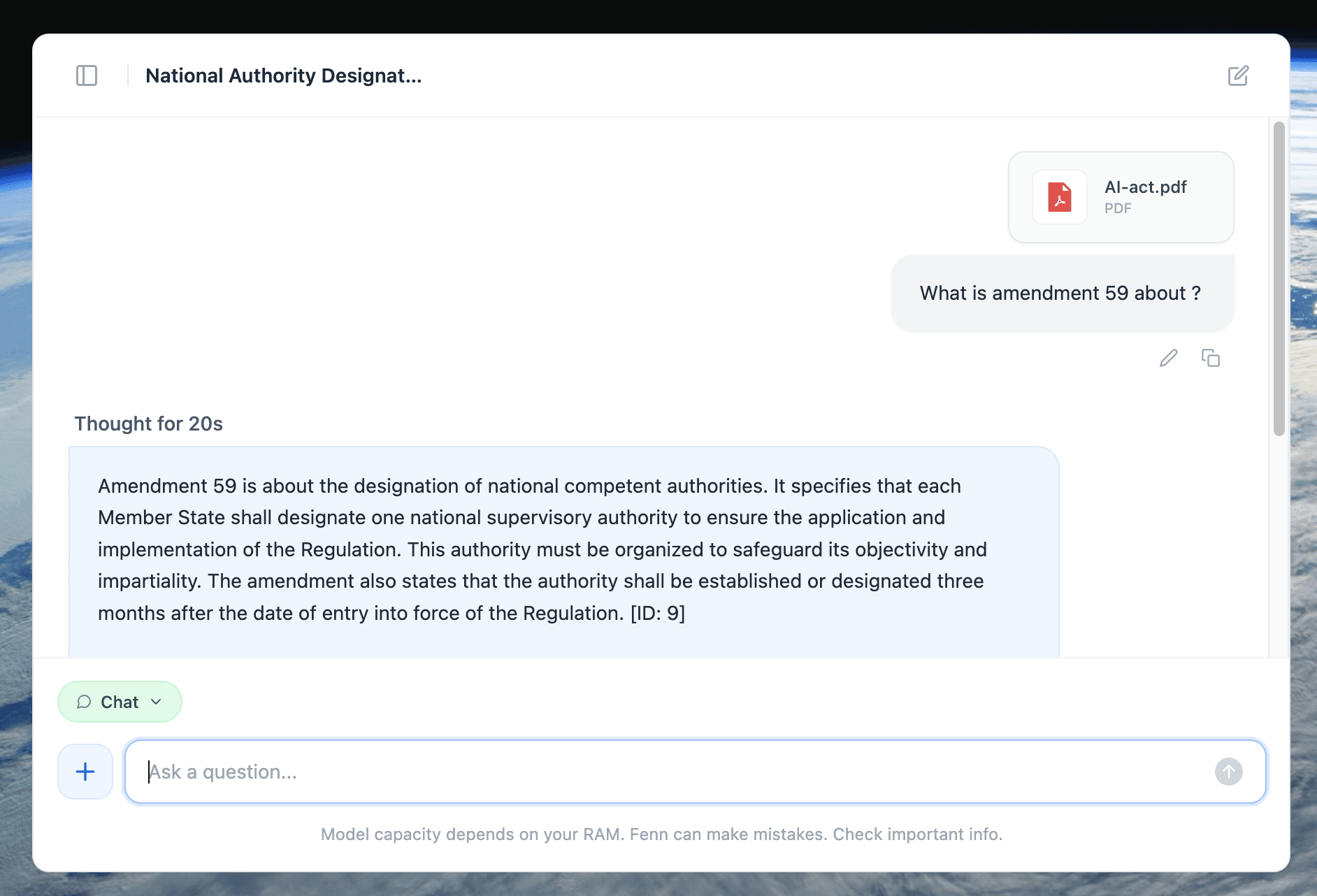
Example of a 100% private chat with a document
A practical “ChatGPT is down” scenario
You are preparing for a meeting. You need the exact wording from a contract clause, plus the slide where the numbers were approved.
When cloud AI is down, most people do this:
search filenames, open the wrong files
scroll and guess
waste time, miss the source
With Fenn:
search the idea you remember
jump directly to the page or slide
copy the source-grounded snippet
keep everything private
That is what a real backup plan looks like.
Who this matters for most
If you work with sensitive or regulated information, cloud AI is often a non-starter:
lawyers and legal ops
finance and M&A
accounting and audit
healthcare operations
agencies handling client data
founders and executives working on strategy
For these workflows, the best AI is the one you can use without asking permission from a cloud provider.
If your AI workflow stops when ChatGPT is down, you do not have a workflow, you have a dependency.
A better default is private AI on your Mac, especially for searching and working with your files.
Find the moment, not the file.