Can you trust Google ?
Can You Trust Google?
TLDR: No, not by default.
Google makes incredible products.
Search is useful. Gmail is useful. Google Docs is useful. Gemini is useful.
But the question is not:
Is Google useful?
The question is:
Can you trust Google with your private data or confidential work?
That is very different.
And when it comes to using Gemini with sensitive files, client documents, personal archives, business data, or confidential work, the safest answer is simple:
No.
Google’s business model is the problem
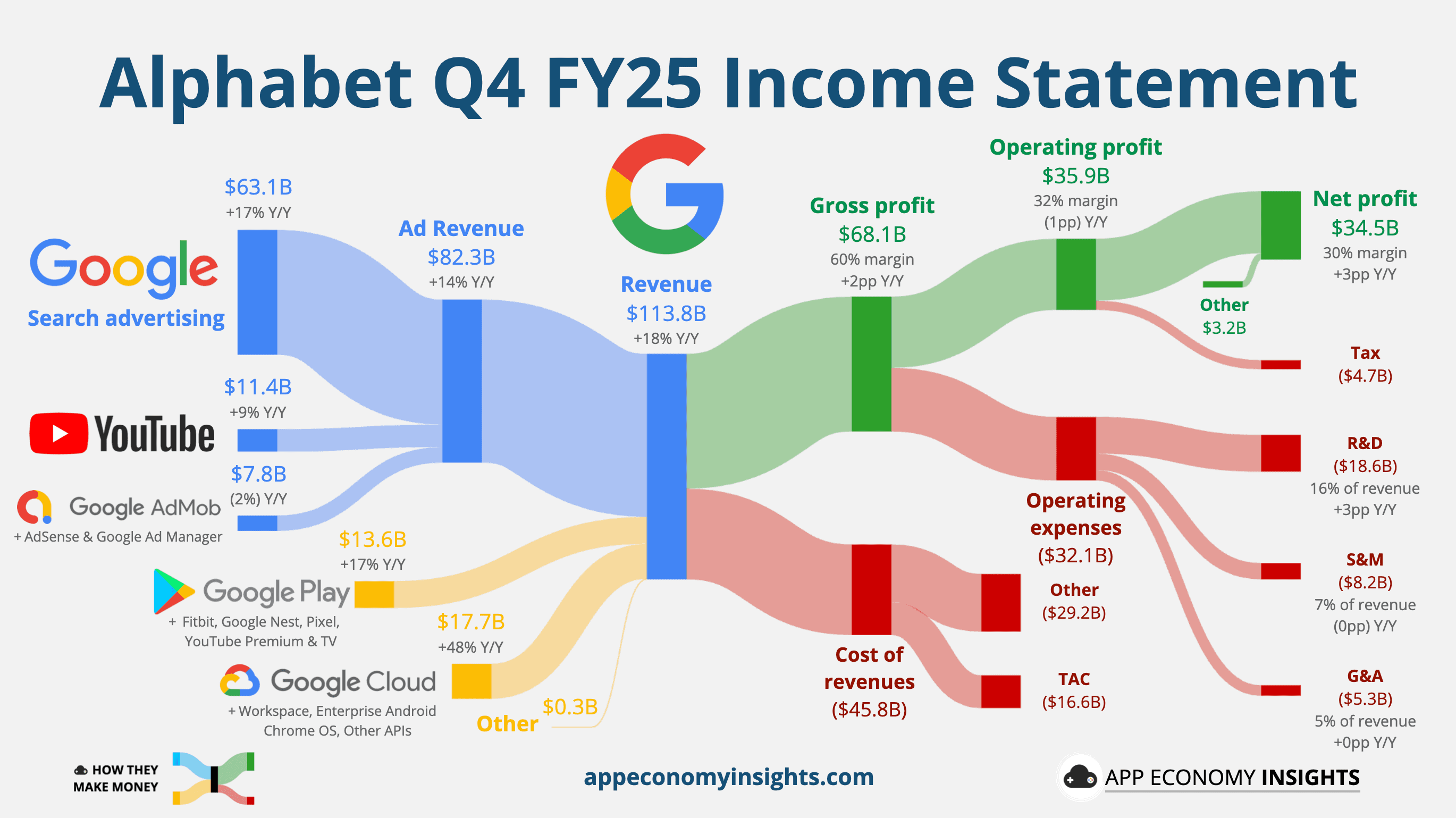
Google is not a normal software company.
Its parent company Alphabet says in its own 2025 annual report that it generated more than 70% of total revenue from online advertising. That is not a side business. That is the center of the machine.
So yes, Google can say it does not “sell your data.”
Fine.
But Google does not need to sell your data directly.
Google sells advertising. Google sells attention. Google sells access to audiences. And that business gets stronger when Google understands more about users, behavior, context, and intent.
That is why giving Google more private context should make you pause.
Gemini is powerful. That does not make it private.
Gemini can help you summarize, write, analyze, code, and reason.
But if you paste private information into Gemini, upload files, or use Gemini through unpaid services, you are not just “using AI.”
You are giving Google sensitive context.
That context might include:
contracts
invoices
emails
client files
internal documents
personal notes
business plans
screenshots
recordings
private archives
That is not just a prompt.
That is your work.
Google’s own terms say the quiet part clearly
This is the most important part.
Google’s Gemini API terms for unpaid services say:
“Do not submit sensitive, confidential, or personal information to the Unpaid Services.”
They also say human reviewers may read, annotate, and process API input and output to help improve Google products.
That should be enough.
Not a blog opinion.
Not a privacy activist claim.
Google’s own terms.
If a product tells you not to submit sensitive, confidential, or personal information, then you should probably not submit sensitive, confidential, or personal information.
Gemini Apps have a similar warning
Google’s Gemini Apps Privacy Hub also says human reviewers may review some collected data, and warns users not to enter confidential information they would not want a reviewer to see or Google to use to improve services.
Again, that is very clear.
If you would not want a Google reviewer to see it, do not put it there.
That includes private files.
That includes client work.
That includes confidential business information.
Paid and enterprise products are different, but that is not the point
Google has different rules for different products.
Some paid, enterprise, and Workspace products have stronger privacy promises than consumer or unpaid services. For example, Google says qualifying Workspace Gemini content is not used for generative AI model training outside the customer domain without permission and is not human reviewed without permission.
That is good.
But most people do not read every policy before using an AI tool.
They just upload the file.
That is the problem.
When the product is powerful, convenient, and backed by Google, people start treating it like a safe place for everything.
It is not.
Private files need a different standard
Your private files are not random internet text.
They are not disposable prompts.
They are your life and work history.
They may contain legal, financial, personal, creative, medical, or business information.
So the privacy question should not be:
Will Google probably behave well?
It should be:
Does this data need to leave my machine at all?
Most of the time, the answer is no.
This is why local AI matters
The safest private data policy is simple:
Do not upload the data in the first place.
That is the whole point of local AI.
If the model runs on your Mac, your files stay on your Mac.
No reviewer.
No cloud upload.
No advertising company in the middle.
No policy you need to keep checking every month.
Where Fenn fits
Fenn is built for that world.
Fenn is Private AI that finds any file on your Mac.
It lets you search, chat with, organize, transcribe, rename, and extract data from files locally on your machine.
Your documents stay on your Mac.
Your searches stay on your Mac.
Your chats stay on your Mac.
Your confidential work is not uploaded to Google, OpenAI, Anthropic, or anyone else.
That is not a privacy setting.
That is the architecture.
The bottom line
Can you trust Google?
With search, maps, email, and everyday tools, many people already do.
But with private data and confidential work in Gemini?
No, not by default.
Google’s own unpaid Gemini API terms say not to submit sensitive, confidential, or personal information. Gemini Apps documentation also warns users not to enter confidential information they would not want reviewers to see or Google to use to improve services.
That should tell you everything.
If your files matter, keep them local.
Download Fenn and find the moment, not the file.