Best Limitless AI Alternative for Mac (Private, On-Device)
Best Limitless AI alternative for Mac (private, on-device)
If you used Limitless (formerly Rewind), you probably loved the same core feeling: you could remember the moment, even when you forgot where it lived.
After the Meta acquisition, Limitless announced it will stop selling the Pendant and sunset non-Pendant functionality like Rewind, with regional availability changes. That has pushed a lot of former customers to look for the closest replacement, especially if privacy matters.
If what you want is a private, on-device way to find things fast on your Mac, Fenn is built for that.
What Limitless and Rewind were great at
Different versions of the product existed over time, but users generally came for three jobs:
Capture: “Record what happened, so I don’t lose it.”
Recall: “Search what I saw or heard, even if I don’t remember details.”
Reduce busywork: “Stop re-reading, re-watching, and re-opening everything.”
That “searchable memory” idea is powerful. The tricky part is finding an alternative that still respects privacy and feels instant.
What most “alternatives” get wrong
When people search “Limitless alternative” they often land on tools that fail in at least one of these ways:
Not private: cloud-first workflows, unclear retention, or third-party processing.
Not precise: results point to the file, but not the exact page, slide, or moment.
Not practical: you have to manually organize and rename everything first.
For ex Limitless users, the bar is simple. You want to type what you remember and land on the right place immediately.
What Fenn is, and why it’s the closest fit for many ex Limitless users
Fenn is not a wearable, and it does not try to record your life.
Fenn focuses on the part that matters to most knowledge workers every day: retrieval.
With Fenn you can:
Search inside files, not just filenames
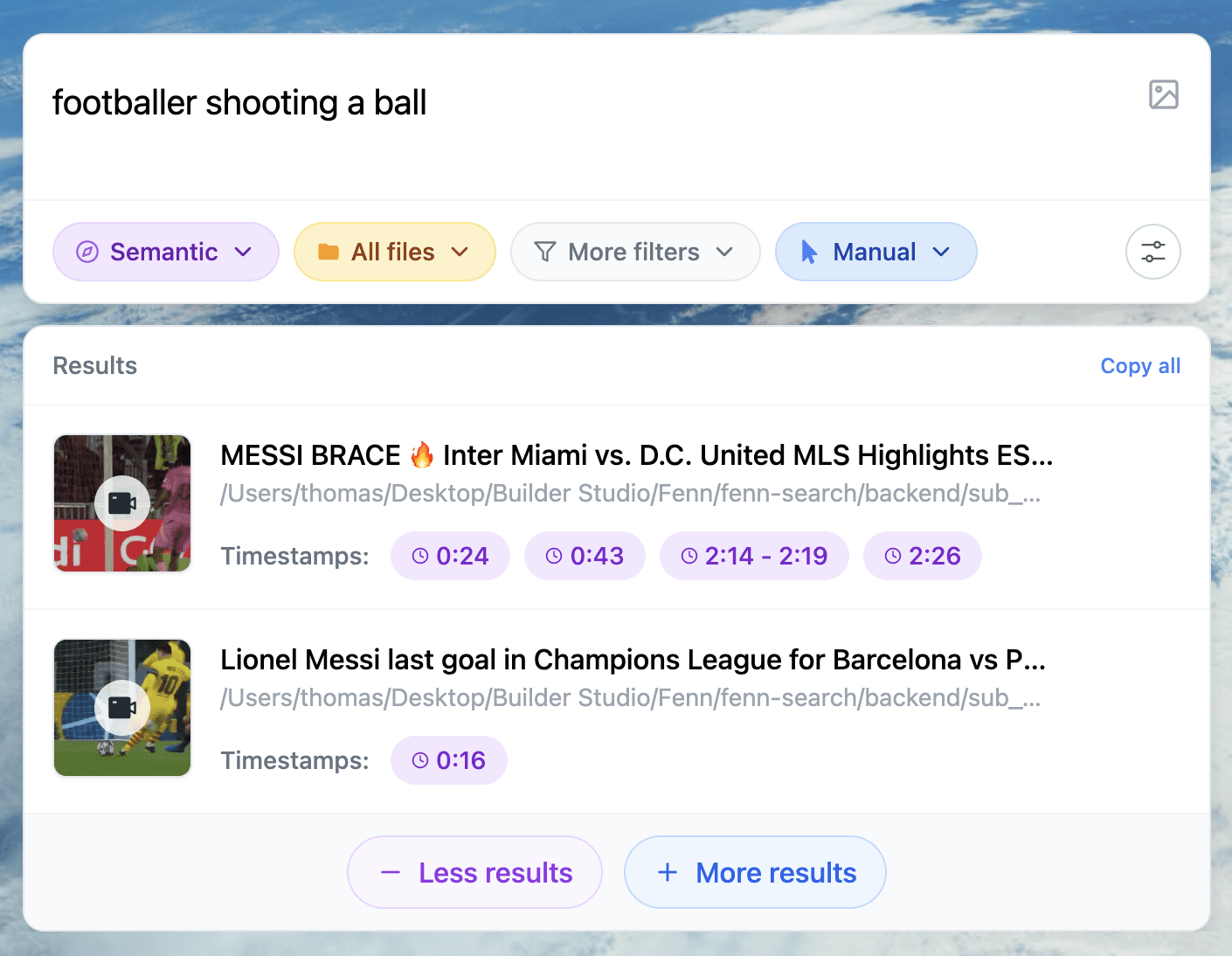
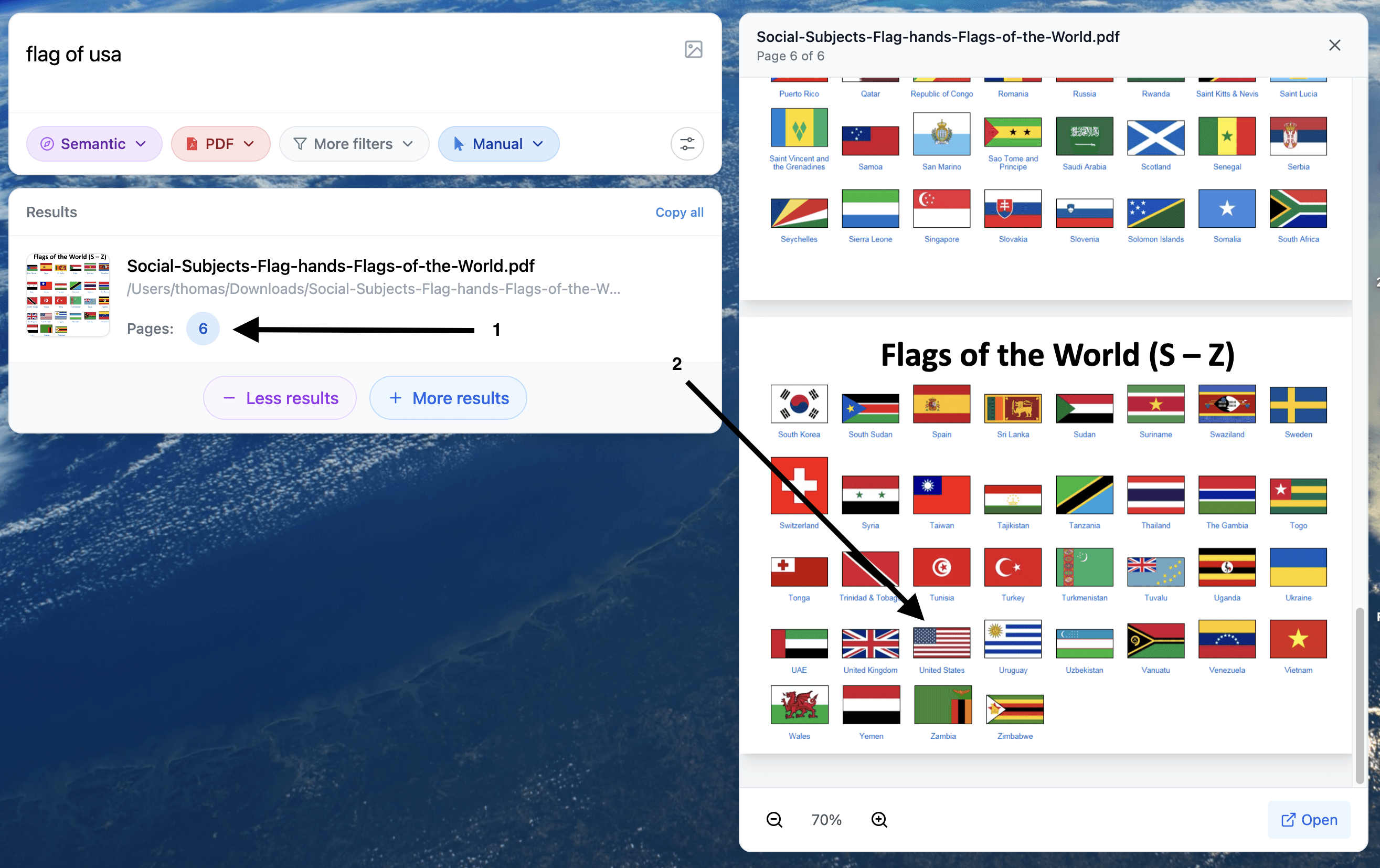
Open the exact place inside your content, like a specific PDF page, slide location, text inside images, audio timestamps, and video frames
Keep everything on device, your data never leaves your Mac
Search across many formats, including EPUB (.epub) if you keep ebooks or reference libraries locally
This is why people who miss Rewind often say Fenn is the nearest product: it recreates the “I remember the moment” workflow, but anchored to the files you already have on your Mac.
Who Fenn is best for (and who it’s not)
Fenn is a strong replacement if you are:
A lawyer searching for a clause across PDFs, email attachments, and scans
A researcher trying to find a quote across papers, notes, and ebooks
A consultant or operator looking for a number inside decks and docs
Anyone with sensitive files who cannot upload content to third-party AI tools
Fenn may not be the right replacement if your primary need is:
A wearable that records real-world conversations automatically
A meeting recorder as the core product
If you already have recordings, transcripts, notes, or exported meeting docs, Fenn is built to make them searchable and easy to jump through.
How to switch from Limitless and rebuild the “searchable memory” workflow
Step 1: Export what you can into files
Depending on what you used, export or save the parts you want to keep as normal files on your Mac, for example:
Meeting summaries and notes (text, markdown, PDF)
Transcripts (text, doc, PDF)
Any documents you referenced often (PDFs, slides, spreadsheets)
Tip: Put everything into one folder, like Limitless Export, so it’s easy to index.
Step 2: Index your folders in Fenn
Open Fenn
Add the folder(s) where your exports and work files live
Let Fenn index locally on your Mac
Step 3: Search the way you actually remember things
Examples you can try immediately:
“termination for convenience” (find the exact clause)
“the chart where revenue dips in Q2” (find the deck slide and context)
“the paragraph about limitations” (find the right section inside a PDF)
“the quote about compounding” (find it across EPUB ebooks and PDFs)
Step 4: Open the exact match
Instead of opening 10 files and scanning, you jump straight to the location that contains the match, with contextual snippets so you can confirm you’re in the right place.
Mini case: the “I know it exists, I just can’t find it” moment
You remember a line from a past project, a client requirement, or a key definition you once read. You do not remember which PDF, screenshot, or ebook it came from.
Spotlight and Finder often fail here because they lean on filenames and metadata. Manual folder organization fails because you rarely have time to do it perfectly.
Fenn’s job is to close that gap: type what you remember, open the exact spot, move on.
Privacy: why ex Limitless users often care more now
If you are switching because you want more control over your data, Fenn is built around a simple promise:
On-device by default. Private AI that finds any file on your Mac.
That means your files stay local, and you can search sensitive client documents, internal research, and confidential material without uploading it elsewhere.
Get Fenn and rebuild your “instant recall” workflow on Mac
If you want the closest replacement to the “searchable memory” feeling, but focused on Mac file retrieval, try Fenn.
Find the moment, not the file.